News: Featured Stories

  • Outlook Change: Know How to Report Suspicious Emails

    Beginning Nov. 16, Microsoft’s Report functionality for reporting phishing and junk email is being removed. Instead, use the “Report Suspicious” button in your Outlook toolbar or the email warning banner to report suspicious messages. If Report Suspicious is not visible in your Outlook client, please contact the IT Service Desk at go.osu.edu/it for assistance. When in doubt, report it You don't...
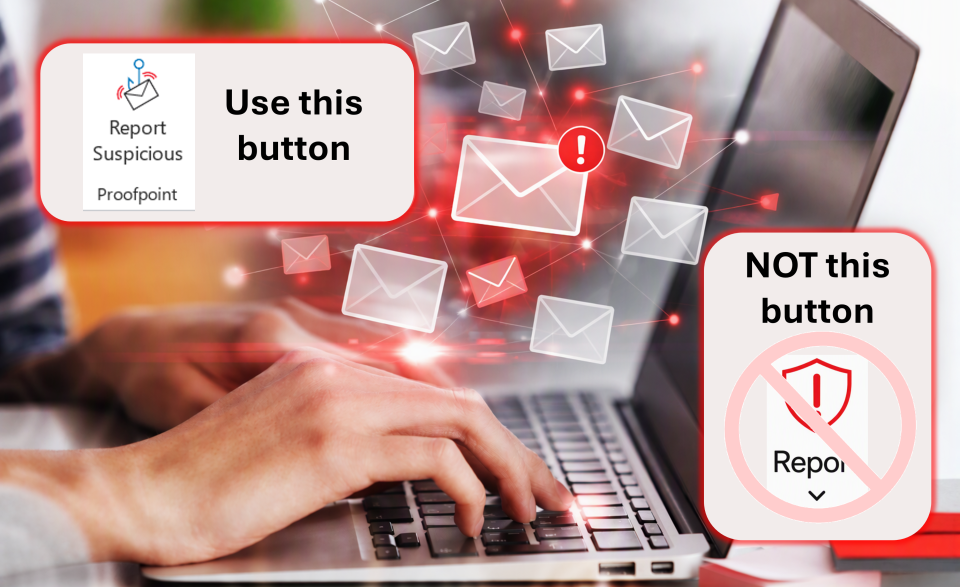
    Graphis telling users to use Support Suspicious instead of Report!
  • Annual Review of Microsoft 365 and Teams External Guest members

    The Ohio State University’s Access Review policy requires all Microsoft 365 Teams and Group owners to perform an annual review of any External Guest members, which includes collaborators from the medical center. Each year, Ohio State sends a notification through Microsoft 365 to Teams and Group owners who have shared content with external guests to confirm that access is still valid and...
    guest review process
  • Missed the Oct. 13 Wi-Fi Update? Here's What to Do Next

    If you use a personal phone, tablet or computer to connect to Ohio State's eduroam Wi-Fi network and did not complete the re-onboarding process by Oct. 13, your device may no longer connect to eduroam automatically. The good news is that it's not too late to update your device.
    decorative image
  • Security Incident Involving Qualtrics Account Prompts Additional Safeguards 

    Ohio State is responding to a recent security incident involving a compromised Qualtrics account that was used to distribute phishing messages to university and external recipients. The incident was identified on Sept. 27, when Qualtrics detected suspicious activity and automatically disabled the affected account. An initial review determined that an unauthorized individual gained access to the...
    woman taking a survey

News Archive