As part of the Managed IT Services (MITS) transition, the Office of Technology and Digital Innovation (OTDI) will move your individual work drive (H Drive) files to OneDrive, Microsoft’s cloud-based storage, on Monday, April 27. This move, originally scheduled for Monday, April 13, continues the work to align with university standards, improve file security and gives you easier access to your files from any device.
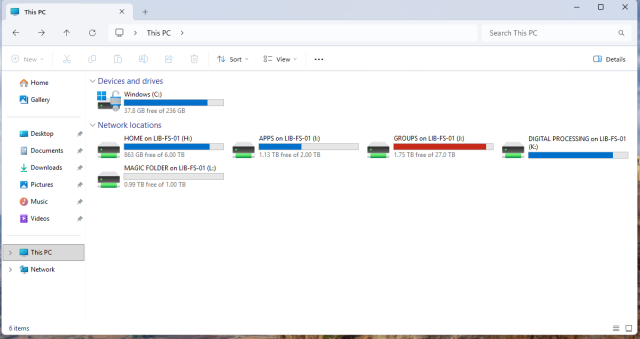
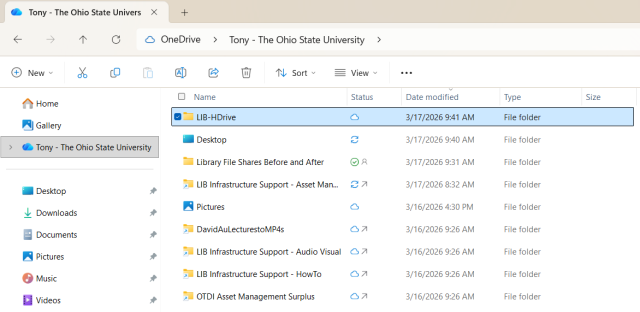
On April 27, your individual work files currently in the H drive will be moved to OneDrive - The Ohio State University\LIB-HDrive.
During the move, there will be a brief period when your H drive files are unavailable. Your files will not be lost. Files are backed up and everything will be securely transferred for you.
What You Need to Do
- By 5 p.m. on April 27, save and close any files stored on your H drive.
- When you return to work on April 28, log into OneDrive to confirm your files are in the correct location at [LIB-HDrive]. Files structures will be maintained.
- After the move, enable OneDrive Sync to ensure your files are automatically backed up and accessible from anywhere. Some Windows machines may already have this feature enabled.
- Learn about restricted file types and what is approved / not approved for storage through the Ohio State Storage Directory. Additional details are included in Ohio State’s institutional data policy online.
- All users are within the university-allotted file storage standard and should not experience storage issues with this transition.
- If you do not store files on the H drive currently, no action is needed.
After the move, your H drive will no longer be available in its previous location. Instead, save files and update any shortcuts to OneDrive.
If you experience any issues after the H drive file transfer, please submit a HUB ticket through the University Libraries LiNKS portal.
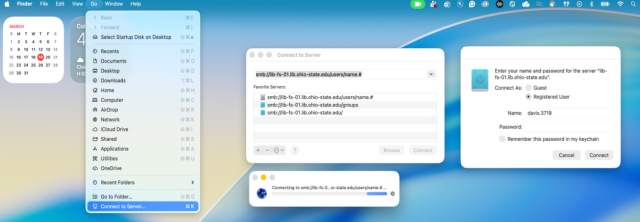
Before and After File Locations
PC
Before - Files on H Drive
After - Files on OneDrive
MAC
After - Files on OneDrive
OneDrive Resources
View guides, job aids and videos