
Due to Microsoft feature changes, Ohio State is updating the login experience for students logging in to Microsoft 365. These changes will help support future-ready authentication technology.
Changes will be rolled out to students in waves beginning on Feb. 16 through Mar. 2. We will notify you by email at least one week before changes are made to your account.
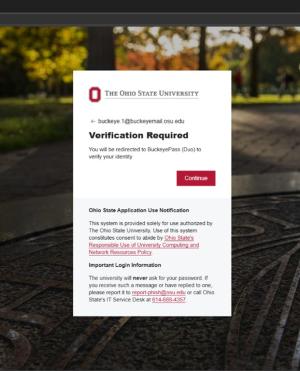
Today, when you login to Microsoft 365 you are immediately prompted to verify through BuckeyePass (Duo). Beginning in January you’ll see an additional “Verification Required” window with a “Continue” button. Clicking “Continue” will take you through the same BuckeyePass process you use today. When you transition in January, the system will log you out once — you’ll just need to sign back in.
These updates help create a more unified, secure login experience across university and medical center systems — ultimately making access smoother and more consistent for everyone.
We’ll share reminders as we get closer to making the change. If you have any questions, we’re here to help! The IT Service Desk is available to support you 24/7. Request IT support online or call the Service Desk at 614-688-4357 (HELP).