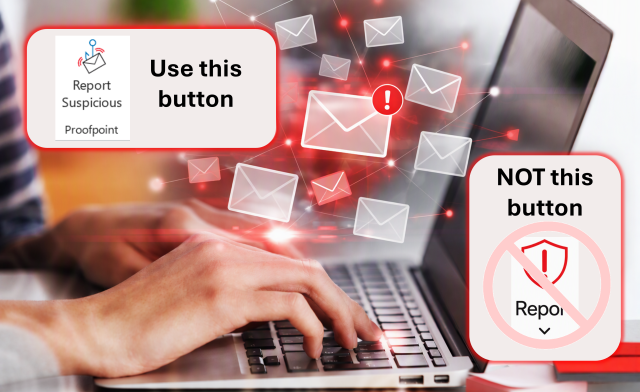
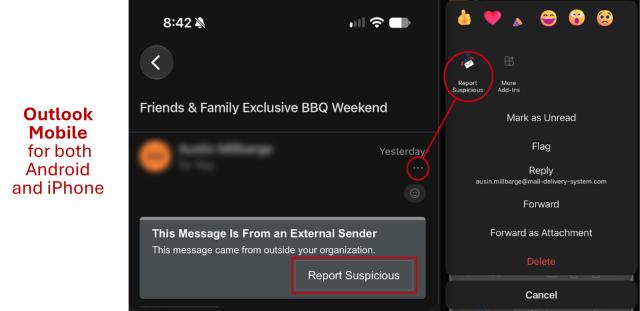
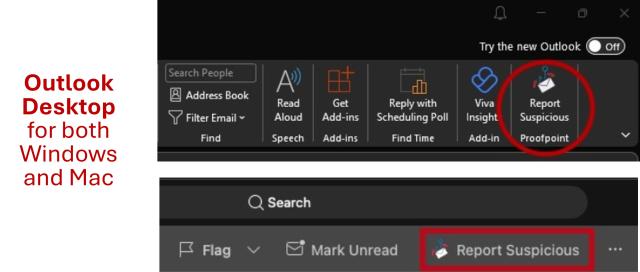
Beginning Nov. 16, Microsoft’s Report functionality for reporting phishing and junk email is being removed. Instead, use the “Report Suspicious” button in your Outlook toolbar or the email warning banner to report suspicious messages.
If Report Suspicious is not visible in your Outlook client, please contact the IT Service Desk at go.osu.edu/it for assistance.
When in doubt, report it
You don't need to determine whether an emai was sent with malicious intent before reporting it. If something seems suspicious, report it.
Reporting suspicious messages allows Ohio State's email security team to determine whether an email is legitimate or malicious. Previous university guidance notes that reporting can also help the security team prevent malicious messages from reaching other users and address malicious websites.
If you believe you entered your credentials on a suspicious website, change your password immediately at my.osu.edu, consistent with Ohio State's recent communications about suspicious messages. Learn more about recognizing messages with malicious intent on Ohio State's Avoid Phishing page.