
Microsoft updates rolling out through 2025–2027 include a unified Outlook–Teams calendar experience, new collaborative notes in Teams powered by Loop, and a wide set of app retirements and support changes across Microsoft 365, Windows, and mobile platforms. These changes include everything from Outlook, Lists, Lens, To Do, Project Online, and Loop components to installation types, operating system support, and scripting technologies like VBScript. Together, they reflect Microsoft’s continued shift toward modern, cloud-first, AI-enabled experiences centered on Microsoft 365 and Copilot, while phasing out legacy apps, platforms, and install models.
Microsoft Teams Updates
New default Calendar Experience shared between Outlook and Teams
Microsoft enhanced the Calendar experience to provide a single, modern, intelligent, and coherent calendar for both Microsoft Teams and Microsoft Outlook users.
WHEN: The New Calendar interface became default with no option to revert in September 2025.
Teams Meetings: Collaborative Notes
Microsoft is introducing Teams Collaborative Notes (powered by Loop) in group chats to co-create and edit notes, agendas, and action items directly within the Teams chat interface, enhancing real-time collaboration without switching contexts.
People will see a new Notes tab in group chats, allowing them to create and collaborate on Loop components such as agendas and action items. These components are editable inline, supporting synchronous collaboration directly within Teams.
WHEN: Rollout will be completed by the end of November 2025.
General updates
Retirement of Saved app in Teams Mobile
Microsoft is retiring the Android and iOS mobile apps for Microsoft Lists. Microsoft recommends people switch to the Microsoft Lists mobile browser experience, which offers more functionality and continues to be updated with the latest improvements.
WHEN: Microsoft Lists mobile retired in November 2025.
Retirement of Loop Components in Word for the Web
Microsoft is retiring the Loop component creation in Word for the web. With this update, existing Loop components will no longer be interactive in Word web documents. Instead, users will see a read-only placeholder with a link to open the Loop component externally. This ensures continued access to content without data loss but removes in-document interactivity.
WHEN: Loop Components in Word for the Web was retired September 2025.
Microsoft To Do ending support for iOS 16 and macOS 12
To maintain app performance, security, and access to the latest features, Microsoft To Do now requires updated operating systems. The iOS version of To Do will support only iOS 17 and later, and the Mac version will support only macOS 13 and later.
WHEN: Support ended in mid-September 2025.
Microsoft changes to Outlook Events from email feature
Outlook’s Events from email feature helps users stay organized by automatically adding reservations such as flights, hotels, rental cars, and deliveries to their calendars. This is used by vendors in their transactional emails, which Outlook then interprets.
Legacy extraction will be retired on January 31, 2026. After this date, only emails sent by vendors using Schema.org markup will be supported for automatic event extraction.
This is for awareness only. There are no changes or steps you need to take.
WHEN: Support will end January 31, 2026.
Prepare for Retirement of VBScript in August 2027
Microsoft has announced that VBScript in Windows is being deprecated and is in its first deprecation phase, available through features on demand (FODs) and enabled by default on Windows 11, version 24H2. If you have any applications or scripts that rely on VBScript, you need to identify and remediate it before the next deprecation phase. In phase 2 VBScript will be disabled by default in Windows. Phase 3 the VBScript feature will be removed from Windows at a later date that has not yet been set.
HOW TO: For more details refer to VBScript deprecation: Timelines and next steps and VBScript deprecation: Detection strategies for Windows.
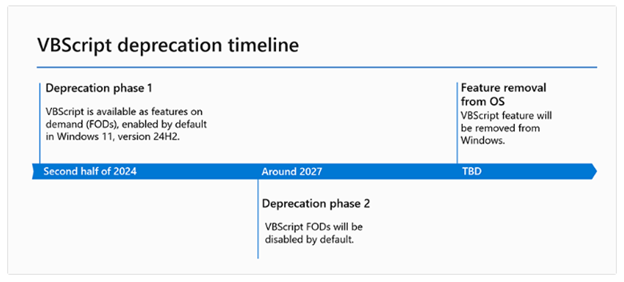
WHEN: Microsoft VBScript in Windows is currently in its first deprecation phase. Phase 2 will be completed August 2027. Dates for Phase 3 are TBD.
Retirement of Legacy Outlook for Mac
As technology evolves, so must our tools to maintain efficiency, security, and user satisfaction. Microsoft launched a new Outlook for Mac client in 2019 and is discontinuing the legacy version this year.
HOW TO: Switch from Legacy Outlook to the new Outlook for Mac client by opening Outlook for Mac and selecting the toggle to turn off the Legacy Outlook switch.
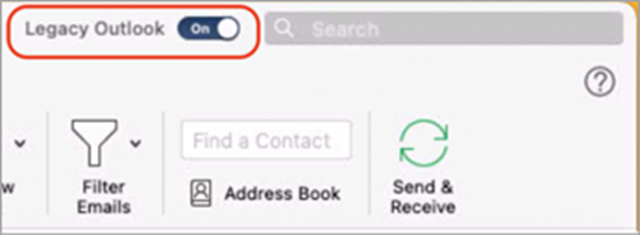
If your version of Outlook doesn't include a toggle, contact your IT support team for assistance.
WHEN: After October 2025, you will no longer be able to use legacy Outlook for Mac client and must switch to the new Outlook for Mac client.
New Outlook for Windows not supported
Currently the new Outlook for Windows is available for use, but it is not Ohio State’s supported version. We are not supporting this new version because the application is still missing features and has issues that Microsoft needs to work through before we can fully adopt the software.
HOW TO: For more details, log in to the Administrative Resource Center to read more in the New Outlook for Windows article.
WHEN: The new Outlook for Windows is available for use now, but it is not Ohio State’s supported version.
Retirement of Microsoft Outlook Lite Android app
The Outlook Lite app on Android was retired starting October 6, 2025. After this date, new installations will be blocked. Existing users can continue using the app for a limited time before full retirement. Anyone using the Outlook Lite app should switch to using the Outlook Mobile app.
WHEN: Retirement began October 2025.
Retirement of Project Online
As technology evolves, so must our tools to maintain efficiency, security, and user satisfaction. Microsoft has announced the retirement of Project Online. This decision reflects Microsoft’s focus on delivering solutions that are modern, scalable, and future-ready—enabling you to take advantage of the latest innovations in AI, automation, and collaboration. By moving to the next-generation platforms, you’ll benefit from enhanced productivity, deeper integration with Microsoft 365, and new capabilities designed for the way people work today and tomorrow.
This update is exclusive to Project Online and does not affect Project desktop, Project Server, or Planner (which brings together Project for the web, Planner in Microsoft 365, and To Do).
To ensure a smooth transition and continued success, Microsoft is providing three clear paths forward.
- The New Microsoft Planner: For organizations seeking a modern, cloud-first, and AI-powered project management experience, the new Planner brings together the best of To Do, Planner, Project for the web, and Copilot. It’s designed for flexibility, collaboration, and scalability—empowering teams to manage everything from simple tasks to complex projects in one unified platform. The premium features of Planner included in our Planner and Project Plan 3 and Planner and Project Plan 5 licenses, offer advanced features such as portfolios, baselines, dependencies, and Gantt charts.
- Project Server Subscription Edition: For organizations with advanced project and portfolio management (PPM) requirements, or those needing a short-term solution before moving to the cloud, Project Server Subscription Edition offers comprehensive tools for planning, scheduling, and resource management—built on the latest SharePoint Server technology.
- Project Operations: For Dynamics ERP customers, especially those focused on timesheets and resource scheduling.
HOW TO: You will need to determine which solution fits your unique needs, plan and execute your transition before the retirement date.
WHEN: Retirement end of September 2026, after which time you will no longer be able to use Project Online or retrieve any data.
Retirement of Microsoft Store installation for Microsoft 365 apps
The ability to install Microsoft 365 apps (Word, Excel, PowerPoint, etc.) using the Microsoft Store is ending. We recommend upgrading to the Click-to-Run installation type for Microsoft 365 Apps.
HOW TO: For more details refer to Microsoft Store Installation Type end of support for Microsoft 365 Apps.
WHEN: New feature updates will stop after October 2025 and security updates will end in December 2026.
Microsoft 365 apps: Support will retire for 32-bit Microsoft 365 apps on Windows Arm-based PCs
Microsoft is retiring support for the 32-bit edition of Microsoft 365 apps for Microsoft Windows Arm-based devices. New feature updates will stop in October 2025 and security updates will end in December 2026. We recommend upgrading to the 64-bit edition for Microsoft 365 Apps. For more details refer to 32-bit Windows Arm-based devices end of support for Microsoft 365 Apps.
WHEN: New feature updates will stop after October 2025 and security updates will end in December 2026.
Copilot Updates
Microsoft 365 Copilot release notes page
A new centralized Microsoft 365 Copilot release notes page is now available, consolidating all Copilot-related updates across various platforms. It includes platform-specific filters and is updated bi-weekly. People can bookmark, share, review, and provide feedback on the page for better planning and awareness of Copilot updates.
HOW TO: To learn how to use the notes page, reference the Microsoft 365 Copilot release notes.
WHEN: Available now.