Over the coming months, Microsoft 365 will continue rolling out updates designed to simplify how people work, collaborate, and plan. These enhancements focus on modernizing tools like Teams and Planner, retiring legacy technologies, strengthening security, and improving access to AI-powered capabilities. Together, these changes support a more streamlined, connected, and future-ready Microsoft 365 experience—while helping users stay productive with tools that are easier to use and better integrated across the platform.
As Microsoft plans for 2026, they have announced the retirment of a number of apps and features. While full details are below, this table provides a quick summary.
Table summarizing retiring apps and features
App/Feature | Type | Retirement / End Date |
|---|---|---|
Viva Goals (Planner integration) | App/Feature | Dec. 31, 2025 |
Microsoft Lens (mobile apps) | App | Retired December 2025; will be removed from App stores in March 2026 |
PowerPoint for the Web – Editor Pane | Feature | January 2026 |
Outlook — Events from Email (legacy extraction) | Feature | Jan. 31, 2026 |
Planner: Whiteboard Tab (premium) | Feature | MidJanuary to midFebruary 2026 |
Planner: iCalendar feed integration | Feature | MidJanuary to midFebruary 2026 |
Loop Planner component | Feature | MidJanuary to midFebruary 2026 |
Microsoft Sway (Windows desktop app) | App | June 1, 2026 |
Project Online | App/Service | End of September 2026 |
Microsoft Publisher (perpetual) | App | October 2026 |
Microsoft Office 2021 LTSC | App Suite | October 2026 |
Exchange Web Services (EWS) | Feature | Oct. 1, 2026 |
Evolution email client access (via EWS) | Feature | Oct. 1, 2026 |
Microsoft Store installation support for Microsoft 365 apps | Feature | Feature updates end October 2025; Security updates end December 2026 |
32bit support for Microsoft 365 Apps on Windows ARM | Feature | Feature updates end October 2025; Support end December 2026 |
VBScript (Windows deprecation phases) | Feature/Platform | Phase 2 August 2027; Phase 3 TBD |
Microsoft Teams Updates
Collaborative Notes in Teams Meetings *UPDATE*
Microsoft is introducing Teams Collaborative Notes (powered by Loop) in group chats to co-create and edit notes, agendas, and action items directly within the Teams chat interface, enhancing real-time collaboration without switching contexts.
People will see a new Notes tab in group chats, allowing them to create and collaborate on Loop components such as agendas and action items. These components are editable inline, supporting synchronous collaboration directly within Teams.
WHEN: Rollout will be completed by the end of January 2026.
Users will be able to choose to hide inactive channels
Teams will offer users suggestions on channels that are inactive, and the user is prompted to review their inactive channels and hide them only if they choose. The user will also be able to view when they last visited the channel to help them decide if they would like to hide the channel.
HOW TO: Manage preferences for automated suggestions via Teams Settings. Select Channels (or General, depending on your version). Review the suggested inactive channels. Choose which channels you want to hide.
WHEN: Roll out will be completed by the end of January 2026.
Improvements to "Activity in other accounts and orgs panel"
Microsoft is improving the panel which shows your Activity in other accounts and orgs in Microsoft Teams to streamline how users triage and respond to cross‑tenant activity. This update reduces the need to switch tenants, helping users stay in context and collaborate more efficiently across organizations.
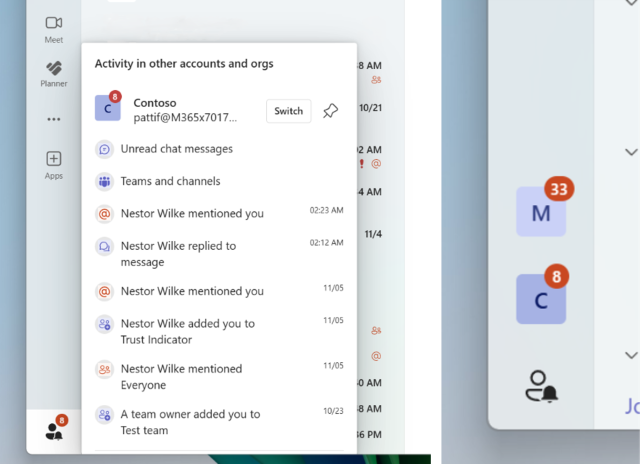
HOW TO: A new Activity panel will be available in the bottom left corner of the main Teams window. You can pin up to 3 tenants to the sidebar to stay updated. Pinned tenants remain in the sidebar even if there is no missed activity.
WHEN: Roll out will be completed by the end of February 2026.
Private chat for organizers and presenters in structured meetings, webinars, and town halls
Teams will be gaining a private chat feature for organizers, co-organizers, and presenters in structured meetings and webinars in Microsoft Teams. This separate chat enhances collaboration by allowing key participants to communicate privately before, during, and after the event, without involving attendees. Additionally, we are unifying backroom chat behavior in town halls to ensure consistent functionality across all structured meetings.
WHEN: Roll out will be completed by the end of March 2026.
Trust Indicators – a new way of representing users outside your organization
To help users quickly identify external participants in Microsoft Teams and reduce the risk of oversharing sensitive information, we’re introducing Trust Indicators—visual labels (badges or icons) next to people’s names. These indicators signal whether someone is external to your organization, a guest, or an anonymous meeting participant.
WHEN: Rollout will be completed by the end of March 2026.
Autocorrect in Microsoft Teams compose text boxes
Autocorrect is coming to Microsoft Teams compose, in both chats and channels. Commonly misspelled words will now be automatically corrected while composing messages. The feature will be enabled by default.
HOW TO: Users can disable this feature by going to Settings > General > Editor spellcheck, Switch off the “Correct words while typing” toggle.
WHEN: Rollout will be completed by the end of January 2026.
Apps now supported in Shared Channels
We’re excited to announce that Microsoft Teams now supports apps in Shared Channels. This update enables richer collaboration scenarios across teams and organizations by allowing users to add and use apps—including bots, tabs, and message extensions—directly within Shared Channels.
WHEN: Rollout will be completed by the end of January 2026.
Apps support in Private Channels
We’re excited to announce that Microsoft Teams now supports apps in Private Channels. This update enables richer collaboration scenarios across teams and organizations by allowing users to add and use apps—including bots, tabs, and message extensions—directly within Private Channels.
WHEN: Rollout will be completed by the end of March 2026.
General Updates
Retirement of Exchange Web Services (EWS) in October 2026
Exchange Web Services (EWS) in Exchange Online will be retired starting October 1, 2026. Organizations must migrate active EWS applications to Microsoft Graph, Power Platform, or Copilot Declarative Agents. Deprecation of Exchange Web Services in Exchange Online details. Any application that uses EWS will need to be updated by the vendor or replaced with a similar product not using EWS. Applications using EWS after October 2026 will stop functioning. OTDI is reaching out to application owners that can be identified to make them aware of the deprecation.
WHEN: EWS support will end on Oct. 1, 2026.
Retirement of Evolution email client use due to Exchange Web Services (EWS) in October 2026
Since Exchange Web Services (EWS) in Exchange Online will be retired, if you currently use the Evolution mail client, you will need to switch to a Microsoft-supported email application before Oct. 1 to continue accessing your email. Supported email applications include:
- Outlook (Windows)
- Outlook for Mac
- Outlook Mobile (iOS or Android)
- Outlook on the web
Once the legacy method is disabled, Evolution will no longer be able to access your mailbox.
WHEN: EWS and Evolution support will end on Oct. 1, 2026.
PowerPoint for the Web: "Editor Pane" retirement notice
To improve consistency and quality across Microsoft 365 writing experiences, Microsoft will retire the Editor Pane in PowerPoint for the Web. This pane, previously available as a preview feature, offered grammar and style suggestions. However, it no longer meets the standards for intelligent writing assistance and will be removed. Users can continue to rely on built-in spell check and Copilot in PowerPoint for enhanced writing support.
WHEN: The Editor Pane will be retired and removed from PowerPoint for the Web in January 2026.
Microsoft changes to Outlook Events from email feature
Outlook’s Events from email feature helps users stay organized by automatically adding reservations such as flights, hotels, rental cars, and deliveries to their calendars. This is used by vendors in their transactional emails for Outlook to interpret. Legacy extraction will be retired on Jan. 31, 2026. After this date, only emails sent by vendors using Schema.org markup will be supported for automatic event extraction.
HOW TO: This is for awareness only. There are no changes or steps you need to take.
WHEN: Support will end Jan. 31, 2026.
Retirement of Microsoft Publisher in October 2026
Microsoft Publisher will no longer be supported after October 2026. People can continue to use it with its current functionality until then. Support for the perpetual version of Publisher will end in October 2026. No action is required at this time, Microsoft is exploring modern ways to achieve common Publisher scenarios across other applications.
WHEN: Support for the perpetual version of Publisher will end in October 2026, when Office LTSC 2021 reaches end of support.
Retirement of Microsoft Office 2021 LTSC in October 2026
Microsoft Office 2021 LTSC will no longer be supported after October 2026. Microsoft introduced Long-Term Servicing Channel (LTSC) as a locked-in, one-time-purchase version of Office designed for organizations that need stability, not frequent feature changes. People can continue to use it with its current functionality until October.
WHEN: Office LTSC 2021 reaches end of support in October 2026
Retirement of Microsoft Sway Desktop
Microsoft is retiring the Sway Windows desktop application (Win32 client) effective June 1, 2026. This change aligns with Microsoft efforts to simplify app management and encourage use of the web-based version, which offers the same capabilities with improved accessibility and support. People can access all current and future Sway features, as well as their content, through the browser interface at sway.cloud.microsoft.
WHEN: Retirement is planned by June 1, 2026.
Retirement of Microsoft Lens Mobile app *UPDATE*
Microsoft will retire the Android and iOS mobile apps for Microsoft Lens. Microsoft recommends switching to Microsoft OneDrive mobile, which offers scanning functionality and continues to be updated with the latest improvements.
WHEN: Microsoft Lists mobile was retired December 2025 and will be removed from App stores in March 2026.
Prepare for Retirement of VBScript in August 2027
Microsoft has announced that VBScript in Windows is being deprecated and is in its first deprecation phase, available through features on demand (FODs) and enabled by default on Windows 11, version 24H2. If you have any applications or scripts that rely on VBScript, you need to identify and remediate it before the next deprecation phase. In phase 2 VBScript will be disabled by default in Windows. Phase 3 the VBScript feature will be removed from Windows at a later date that has not yet been set.
HOW TO: For more details refer to VBScript deprecation: Timelines and next steps and VBScript deprecation: Detection strategies for Windows.
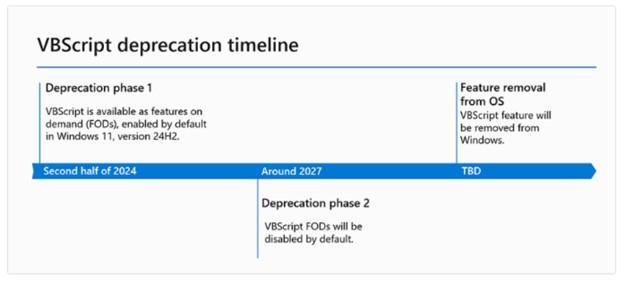
WHEN: Microsoft VBScript in Windows is currently in its first deprecation phase. Phase 2 will be completed in August 2027. Dates for Phase 3 are TBD.
New Outlook for Windows not supported
Currently the New Outlook for Windows is available for use, but it is not Ohio State’s supported version. We are not supporting this new version because the application is still missing features and has issues that Microsoft needs to work through before we can fully adopt the software.
HOW TO: For more details, log in to the Administrative Resource Center to read more in the New Outlook for Windows article.
WHEN: The New Outlook for Windows is available for use now, but it is not Ohio State’s supported version.
Retirement of Project Online
Microsoft has announced the retirement of Project Online. This decision reflects Microsoft’s focus on delivering solutions that are modern, scalable, and future-ready—enabling you to take advantage of the latest innovations in AI, automation, and collaboration. By moving to the next-generation platforms, you’ll benefit from enhanced productivity, deeper integration with Microsoft 365, and new capabilities designed for the way people work today and tomorrow.
This update is exclusive to Project Online and does not affect Project desktop, Project Server, or Planner (which brings together Project for the web, Planner in Microsoft 365, and To Do).
To ensure a smooth transition and continued success, Microsoft is providing three clear paths forward.
- The New Microsoft Planner: For organizations seeking a modern, cloud-first, and AI-powered project management experience, the new Planner brings together the best of To Do, Planner, Project for the web, and Copilot. It’s designed for flexibility, collaboration, and scalability—empowering teams to manage everything from simple tasks to complex projects in one unified platform. The premium features of Planner included in our Planner and Project Plan 3 and Planner and Project Plan 5 licenses, offer advanced features such as portfolios, baselines, dependencies, and Gantt charts.
- Project Server Subscription Edition: For organizations with advanced project and portfolio management (PPM) requirements, or those needing a short-term solution before moving to the cloud, Project Server Subscription Edition offers comprehensive tools for planning, scheduling, and resource management—built on the latest SharePoint Server technology.
- Project Operations: For Dynamics ERP customers, especially those focused on timesheets and resource scheduling. Microsoft Dynamics ERP is a suite of enterprise resource planning (ERP) software.
HOW TO: You will need to determine which solution fits your unique needs, plan and execute your transition before the retirement date.
WHEN: Retirement end of September 2026, after which time you will no longer be able to use Project Online or retrieve any data.
New Planner updates
In early 2026, Microsoft will begin rolling out a new major update of the Planner app in Teams desktop and web as well as Planner on the web. This update will come with several new enhancements, and Microsoft will also be retiring several features at this time. See each section below for more detail on the timing.
New features in the upcoming Planner update:
- These changes will be available with the new update, which we expect to begin rolling out between mid-January 2026 and mid-February 2026.
- Tasks chats in basic plans will allow team members to collaborate directly on tasks using rich text formatting and @mentions, making it easier to discuss work and notify teammates about what needs attention.
- Custom templates will allow you to create reusable, pre-designed plan layouts tailored to your organization’s needs, ensuring consistency and saving time. They provide the ability to standardize content while allowing easy customization for specific scenarios.
- Project manager agent will now be available in all plans for M365 Copilot licensed users, including basic plans.
These features in Planner that will be retired:
- The following changes will take effect as this build rolls out to your organization:
- A new Task chat experience will replace the prior comments experience for basic plan tasks:
- As noted above, the previous task comments experience will be replaced by a new task chat feature that supports messages about the task that can include @mentions and rich text formatting, in response to a longstanding top customer request. Due to customer feedback on our notifications experience, the new chat feature only sends an email/Teams notification to a colleague that’s been @mentioned in the message.
- The task chat experience will be available on Planner in Teams web/desktop and the Planner web experience, and the old experience for viewing comments will no longer be directly visible on a task. Instead, the task details pane will show a link to open a page in Outlook where task comments can be seen.
- Users can continue to use and see the previous task comments experience in the iOS Planner app, Android Planner app, and Planner in Teams mobile. New task chat messages will not be visible in the mobile experience at this time.
- There are no changes to email notifications for the existing task comments experience, meaning that an email notification will be sent to all group members associated with the plan when a task comment is added.
- There is no change to the premium plan conversations feature at this time.
- The whiteboard tab for premium plans will be retired.
- This feature automatically created a whiteboard for premium plans in Planner and allowed users to create tasks in Planner from that whiteboard's sticky notes.
- The whiteboard tab will be unavailable on the premium plan after retirement of this feature.
- Users will be unable to create tasks from a whiteboard as a result.
- Any existing whiteboard content will remain available via the Whiteboard app.
- There is no replacement for this feature at this time.
These features outside of Planner that will be retired without replacement:
- Planner integration in Viva Goals.
- Viva Goals will be retired on December 31, 2025, as previously announced. Refer to Viva Goals retirement for more information.
- When Viva Goals is retired, the entry point in Viva Goals for use with Planner will no longer be available.
- iCalendar feed integration retirement.
- This feature will be retired between mid-January 2026 and mid-February 2026.
- This feature allowed users to subscribe to their Planner tasks as an iCalendar feed that could be viewed in iCalendar-compatible applications like Outlook.
- After this feature is retired, users will not be able to create new iCalendar feeds for their tasks or plans, and they will stop seeing their tasks in the iCalendar feeds they previously created.
- There is no replacement for this feature at this time.
- Planner component retirement in Loop pages.
- The Planner control in Loop will be retired between mid-January and mid-February 2026.
- Previously, this control could be added in a Loop workspace by typing /planner to capture task information. After retirement:
- New components of this type can no longer be added.
- Existing components will display the Planner plan URL where the control was previously located.
- We recommend using the Task List Control in Loop to capture and manage tasks going forward.
WHEN: Roll out completed by end February 2026
Retirement of Microsoft Store installation for Microsoft 365 apps
The ability to install Microsoft 365 apps (Word, Excel, PowerPoint, etc.) using the Microsoft Store is ending. We recommend upgrading to the Click-to-Run installation type for Microsoft 365 Apps.
HOW TO: For more details refer to Microsoft Store Installation Type end of support for Microsoft 365 Apps.
WHEN: New feature updates will stop after October 2025 and security updates will end in December 2026.
Microsoft 365 apps: Support will retire for 32-bit Microsoft 365 apps on Windows Arm-based PCs
Microsoft is retiring support for the 32-bit edition of Microsoft 365 apps for Microsoft Windows Arm-based devices. New feature updates will stop in October 2025 and security updates will end in December 2026. We recommend upgrading to the 64-bit edition for Microsoft 365 Apps. For more details refer to 32-bit Windows Arm-based devices end of support for Microsoft 365 Apps.
WHEN: New feature updates will stop after October 2025 and security updates will end in December 2026.
Copilot Updates
Microsoft 365 Copilot release notes page
A new centralized Microsoft 365 Copilot release notes page is now available, consolidating all Copilot-related updates across various platforms. It includes platform-specific filters and is updated bi-weekly. People can bookmark, share, review, and provide feedback on the page for better planning and awareness of Copilot updates.
HOW TO: To learn how to use the notes page, reference the Microsoft 365 Copilot release notes.
WHEN: Available now.