With an increasing need for early detection of malicious activity the university is complementing our existing security tools by providing a service called the Enhanced Endpoint Protection Service (EEPS) powered by the CrowdStrike Falcon platform. This service improves the protection of our endpoints and institutional data.
The Enhanced Endpoint Protection Service (EEPS) is hosted by the Office of Technology and Digital Innovation. The service provides an Endpoint Detection and Response (EDR) tool that can identify connections to potentially malicious networks and potentially malicious application behaviors on university systems (e.g., desktops, laptops, and servers). It then applies enhanced protections including but not limited to quarantining infected systems from others if malicious behavior is detected.
To preserve your privacy and keep information confidential, EEPS tools monitor endpoint activity at a technical level. For example, if a PDF document attachment is downloaded from email and opened, these tools will detect that a PDF reader was used and the name of the PDF document but will not access the content of the document. If after opening the PDF there were attempted unwanted changes to the system or the PDF reader behaved suspiciously, the tool could help detect this threat and then defend you from an attack without accessing the content of the document.
If you have any questions or concerns, please contact the Digital Security and Trust's EEPS Support team at cio-eeps@osu.edu.
FAQ
Most users of CrowdStrike at the university should never need to worry about how it functions as it is a seamless tool used to protect devices. However, users may have questions about the service itself and below are some of the most common questions or concerns a user may have about the software.
Why do we need EEPS?
With the increase in remote work for many employees and the increase in ransomware activity world-wide, the university needs more tools to offer better protection of our institutional data and systems from malicious actors. Our approach is to use a tool called Endpoint Detection and Response (EDR) to obtain visibility into system behavior. EDR tools help detect malicious activity, even in a remote work environment, and rapidly mitigate or isolate the activity to prevent further disruption to your work and university systems.
What is an EDR tool?
Endpoint Detection and Response (EDR) tools are used to detect malicious behavior of bad actors who have gained or are attempting to gain unauthorized access to university systems. EDR tools allow security teams to quickly detect malicious behavior and take swift action to mitigate and reduce the impact of security incidents.
Will this service impact my privacy?
Digital Security and Trust is committed to protecting institutional data and computing resources. Our dedicated security professionals follow university policies. Likewise, when you use university computing resources, your activities are monitored. Computing resources may include: information systems, networks, and mobile devices, and the institutional data they contain.
Digital Security and Trust is tasked by university policies to maintain an effective security program to protect university stakeholders. Digital Security and Trust has security practitioners with the highest ethical standards dedicated to creating and maintaining a proactive, top-quality security program for The Ohio State University. To be successful, Digital Security and Trust is working within the boundaries of the current Institutional Data, Responsible Use and Information Security policies.
One of the Ohio State Privacy Principles is to investigate reports of unauthorized or inappropriate access to personal information. Here’s how to report a concern:
- Speak with your supervisor or another appropriate person in your department, school or unit,
- Report anonymously using EthicsPoint, a third-party vendor, or
- Email the Office of University Compliance and Integrity's Privacy Team at compliance-integrity@osu.edu.
Will this tool cause my computer to run slower?
No, EEPS is utilizing a toolset known as Endpoint Detection and Response (EDR), which is designed to have as little impact on your system as possible.
Who can use CrowdStrike?
Only faculty and staff devices can use CrowdStrike. Personal and student devices are not part of our licensing.
Are mobile devices supported?
No, mobile devices are not supported under our licensing.
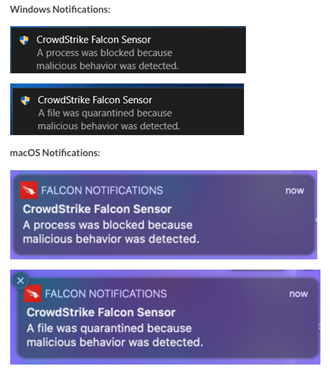
Does CrowdStrike alert me when it finds something?
Yes, CrowdStrike will show a pop-up message like below.
Am I supposed to do anything when I receive a CrowdStrike alert?
If you do see these notifications, you should contact your local IT help desk or ServiceDesk@osu.edu for additional assistance.
Can I run a full scan on my university device?
Yes, you can use CrowdStrike to run a full scan of your university device (Windows only).
You can run a full scan by following the steps below:
- After you find the file/folder/drive you would like to scan, right click on the file/folder/drive. Note: Once a scan has started you can cancel/stop a scan by right click > CrowdStrike Falcon malware scan > Stop Scan.
- Select CrowdStrike Falcon malware scan
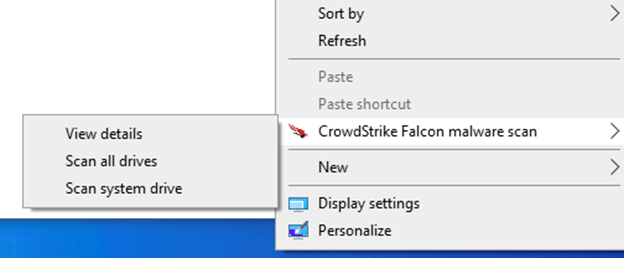
Select Scan, Scan all drives, or Scan system drive
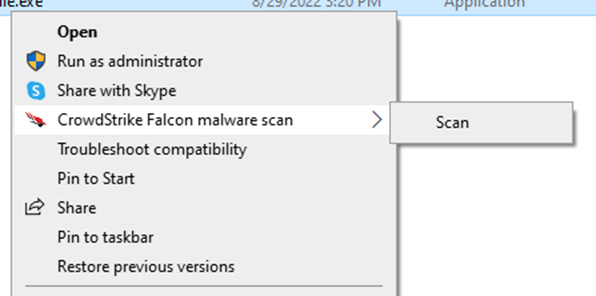
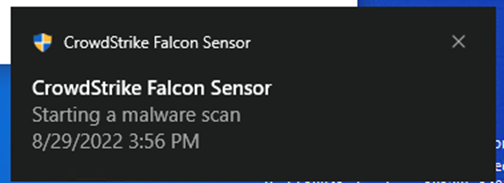
After selecting scan the following notification will pop-up
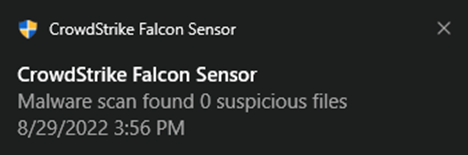
When the scan is complete one of the following notifications will pop-up
Scan results can also be found on the desktop itself. You can find scan results on the desktop by Right Clicking > Select CrowdStrike Falcon malware scan > View Details
Request the Service
To request access and schedule an initial consultation, please contact our team at eeps@osu.edu.
Support
Information about using the EEPS service can be found on the service's knowledge site.
Contact
Email: cio-eeps@osu.edu