This job aid describes the various audits that OU Admins must conduct on a semiannual basis. OU admins are required to participate in the audits to ensure that end users experience a seamless, consistent experience in BuckeyeLearn.
Audits take place in March and September. The audit reports for your provider are saved in the OU Admin Audits folder. Please follow the instructions in this document to conduct the audit and contact buckeyelearnsupport@osu.edu if you have any questions.
Audit findings are recorded and summarized for historical usage.
Process
- BuckeyeLearn Support team runs audit reports for applicable tasks
- BuckeyeLearn Support team shares audit reports and instructions with OU admins
- OU admins review audit reports and complete audit tasks
- OU admins email buckeyelearnsupport@osu.edu to report back audit task completion to BuckeyeLearn Support team
Only documents that are applicable to your provider during this audit will be saved to your unit folder. You may be required to complete some or all of the audit processes below.
Update Training Titles
Access the Course Catalog and update training titles as needed. To see the list of all training titles under a training provider, run the OU Admin Audit Optional Report - Training Titles and Details in Reporting 2.0.
- Review the training titles for compliance with the BuckeyeLearn Standards.
Training titles must NOT contain
- Department names
- Acronyms
- Audience description
- The word “training” or “curriculum”
- Training hours (all learning objects must have the duration of the training in the Training Hours field)
- Review for training titles that include previous academic years or fiscal years.
Review
- If you have a training with a previous academic year or fiscal year in the title that is still active and up to date, consider removing the year from the title or updating it to the current year.
- If you have a training with a previous academic year or fiscal year that is NOT active or up to date, retire the training or remove the availability.
Update Training Descriptions & Details
Training descriptions are required. Do not leave this field blank. To provide users with a consistent experience across providers in BuckeyeLearn, the following requirements must be followed when entering training descriptions and certain details about a training. This applies to all LO types (including ILTs and online training).
Access the Course Catalog to view and update training descriptions as needed. To see the list of all training descriptions and details under a training provider, run the OU Admin Audit Optional Report - Training Titles and Details in Reporting 2.0.
- Review training descriptions for compliance with the BuckeyeLearn Standards.
Training descriptions must contain
- Detail of the topic(s) covered and course objectives
- Length of time (in minutes)
- The intended audience (such as individuals with fiscal reporting roles, HRBPs, or Managers)
- Use blue or red text for links and email addresses (Note: The font color is not shown in the Training Descriptions & Details document. View the training description on the course console page and click the Edit link next to the description to format the text in the description.)
- Format training description so that descriptions are broken up by paragraph; avoid walls of text
- Update Event descriptions with ILT-Specific Requirements, including an accessibility statement and whether the event is in-person or a webinar.
- Update Online Course descriptions with Online Course-Specific Requirements, including an accessibility statement and a training contact.
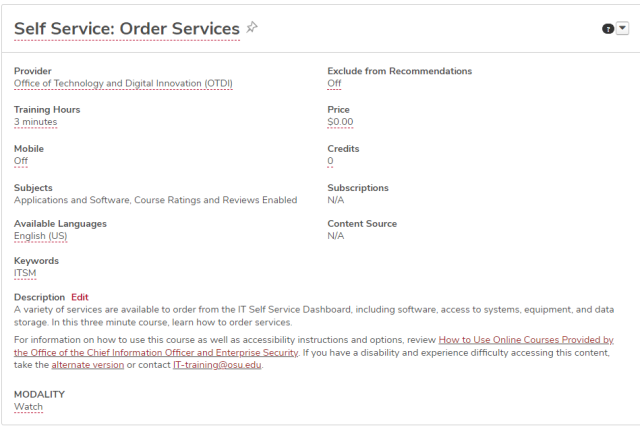
- Review other training details on the Course Console page.
Review
- Availability: Make sure the availability for each session is accurate and up to date
- Keywords: Make sure the keywords field has keywords that will help learners find the training (included only in training that has availability)
- Training Hours: Do not leave this field blank. Make sure each training has training hours listed and ensure that this value matches what is listed for the length of time (in minutes) in your description
- Prerequisites: Make sure the prerequisites for any trainings that have them are still active or include the current version of the course
Update Instructor-Led Training (ILT)
Review Instructor Status
Use the Instructor Status document for this audit task.
- Remove any instructors that have not been active within the past year.
Update Instructors
Use the Admin Listed as an Instructor document for this audit task.
Update any sessions that have administrator accounts listed as the instructor to the user’s learner (lastname.#) account.
Update Training Contacts
Use the Admin Listed as a Training Contact document for this audit task.
Update any sessions that have administrator accounts listed as the training contact to the user’s learner (lastname.#) account.
Submit Rosters
Use the Learning Admin Console for this audit task. To see the list of all training titles under a training provider, run the OU Admin Audit Optional Report - Unsubmitted Rosters in Reporting 2.0.
- Submit rosters for all sessions.
Update Curricula
Use the Inactive LOs inside Curricula document for this audit task.
- Review any learning objects (LOs) that are no longer active but are still within a curriculum.
- Reversion the curriculum to remove or replace the inactive course.
Review Materials
Use the Links in Materials document for this audit task.
- Launch each material link to ensure it still works.
Review Administrators
Use the Admin Last Log In document for this audit task.
- Make sure all admin accounts are still in use.
Review Dynamic Assignments
Use the Dynamic Assignments document for this audit task.
- Make sure all dynamic assignments are still relevant.