
Remove an Instructor From a Vendor

Remove instructors from your vendor when they are no longer needed.

For additional information, visit Cornerstone's online help.

  1. In the ILT menu, click Vendors & Instructors. 
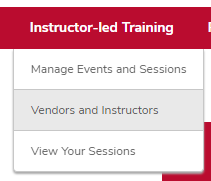
    The ILT menu expanded with the Vendors & Instructors option circled
  2. Click the Instructors link on the vendor you want to remove an instructor from. 

    The Vendors & Instructors page with an Instructors link circled
  3. Uncheck the Active box on the instructor you want to remove. 

    The instructor page with the Active checkbox circled
 

Critical Note:

Instructors are removed immediately from your list.

If you accidentally remove an instructor, uncheck the View active instructors only checkbox, then recheck the Active box for that instructor.