Each session must have at least one part, or scheduled date and time. Sessions can have multiple parts, such as for multi-day ILT or for morning and afternoon parts. Contact your OU admin for your area’s policies about sessions with multiple parts.
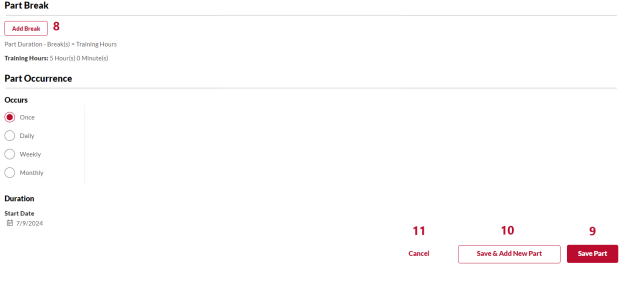
Review each numbered area to learn more about the Edit Part page
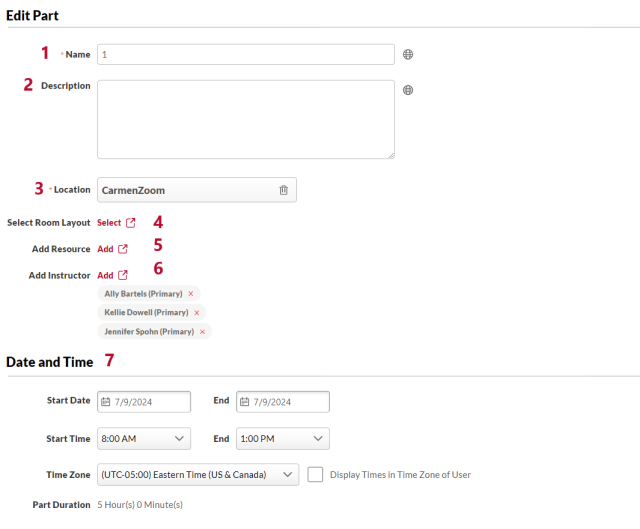
- Name: A name for the session part. The Default is 1. This field is required. Contact your OU admin to review your area’s policies about part names.
- Description: A description of the session part. Contact your OU admin to review your area’s policies about part descriptions.
- Location: Select the location of your session. If your location is not in the list, contact your OU admin. Please note that selecting the location does not reserve the room. Follow your areas procedures to reserve rooms.
- Select Room Layout: This functionality is not used at Ohio State.
- Add Resource: This functionality is not used at Ohio State.
- Add Instructor: Add or remove instructors from this session.
- Date and Time: Select the date and time of the session part.
- Part Break: Add scheduled breaks, such as lunch breaks, if needed. Contact your OU admin to review your area’s policies about part breaks.
- Save Part: Save this session part.
- Save & Add New Part: Save this session part and then add another part.
- Cancel: Cancel creating this session.