As a member of the Ohio State university, you have access to the university instance of Microsoft 365 through your Ohio State username (lastname.#) and password. You may also be a guest of another instance of Microsoft 365 at the Wexner Medical Center or a regional campus. Logging in and out of instances and switching organizations (Please see Switching Between Organizations for details) may be cumbersome if you have to do it multiple times a day.
One option you have available is to be logged into two separate instances at the same time using both the desktop application and the web-based application.
Start by launching the desktop application and logging in using your account information. Verify that you are working in the correct organization by checking the organization name in the upper right-hand corner of the screen, next to your name.
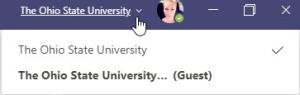
Next open your preferred web browser and navigate to http://teams.microsoft.com. Log in using the appropriate account information. You are now logged into Teams in two separate windows. In your web browser, change the organization you are working in using the organization name next to your name. Now you have one organization in the desktop app and one in the web app allowing you to work in both instances at once.
On rare occasion you may have separate accounts on separate instances of M365. An example would be a medical center account for the medical center instance, using a medical center username and password, and an OSU account, using your lastname.#, for the OSU instance. These same steps will work; you just need to log into the desktop application using one account and the web-based application using the other account.