Remove Self-Requested Training

Learners can remove self-requested training from their transcript in BuckeyeLearn.

The removal option is only available for training that you have registered for. You cannot remove training that has been assigned to you.

If your manager assigned training to you, they can remove it.


Helpful Note:

If you are unable to remove training you requested, contact the IT Service Desk or Wexner Medical Center help desk.

  1. Open your transcript.
  2. Click the down arrow on the course you wish to remove and click Remove. 
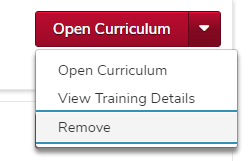
    the transcript page with the menu expanded and the remove option visible
  3. From the Select Reason drop down menu, select a reason for the removal. 
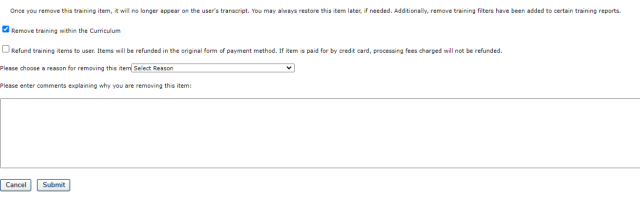
    the remove training page with the reason menu expanded, showing multiple options
     

    Helpful Note:

    While not required, typing a comment can assist in providing additional information for the removal. 

  4. If the training is a curriculum, check the Remove training within the Curriculum box. 


    Critical Note:

    If the Remove training within the Curriculum box is not checked, all of the individual training titles within the curriculum will remain on your transcript and you will need to remove each training title individually. 

    the remove training page with the Remove training within the Curriculum box checked and circled
  5. Click the Submit button 

    submit button

    .