The retirement process ensures that the BuckeyeLearn Support team, OU admins, and learners are aware that training will no longer be available in BuckeyeLearn.
One Month Before Retiring a Training
Before you retire a training, you must ensure that it is not being used by others in their training and that you communicate with other admins and users.
Communicate to OU Admins and the BuckeyeLearn Support Team
If you are retiring a training that is used outside of your area, let OU admins and the BuckeyeLearn Support team know that you will be retiring the training.
Communicate to Users
Run a report to review how many learners are in a registered or in progress status. Consider communicating with these users about the upcoming retirement, asking them to complete training before then.
Edit the Course Description
Add a note to the top of the training's description that the course will be retired and the date on which it will be retired. Example: "This course will be retired on June 30, 2021. Complete the course by that date or take the new version on July 1, 2021."
Run Reports on the Training
Run reports to review:
- If the course is included in any dynamic learning assignments
- If the course is included in any curricula
- If the training has any equivalencies
- If the course is a prerequisite for other training
Communicate directly with any OU admins who are using the training as identified in the reports.
Retiring a Training
To retire a training,
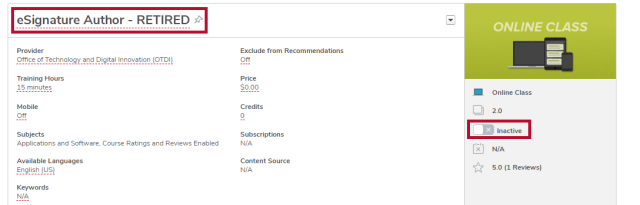
- On the course’s course console page, move Active/Inactive toggle to off. You will be prompted to confirm your action.
- Add the word “RETIRED” to the end of the course title.