Blocking Callers in Teams:
To block external callers that have called you:
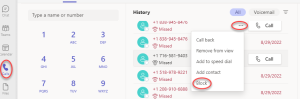
- Click on the Calls tab in the left navigation bar on your screen
- Locate the external phone number you wish to block
- Click the ellipses/more options (…) button
- From that menu, select Block
Block all external calls with no caller ID (anonymous):
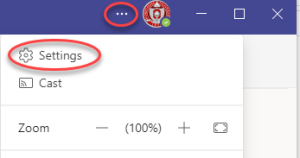
Open your settings by clicking the ellipses in the upper right corner of the Teams interface and selecting Settings
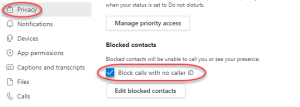
- Click the Privacy Tab on the left hand menu
- Under Blocked contacts, select the option to Block calls with no caller ID
View your blocked numbers or unblock a number
Open your settings by clicking the ellipses in the upper right corner of the Teams interface and selecting Settings
- Select the Privacy in the navigation pane
- Select Edit blocked contacts
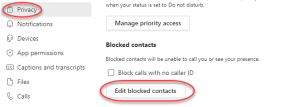
- Click Unblock, to unblock any numbers