You can now collect information from attendees and be able to securely share it with the staff while maintaining industry specific compliance requirements (such as HIPAA). Microsoft Bookings app in Teams will be integrated with Microsoft 365 Forms to support end to end (Pre-visit) workflows for virtual visits.
This feature will let Admins and schedulers enable pre-visit data collection workflows for virtual visits by linking Microsoft 365 Forms to appointments in the Bookings app in Teams.
- Admins can now link Forms to a Bookings service type through the Bookings app in Teams.
- When creating a new appointment from Bookings app in Teams, Forms associated to the booking Service will automatically be added to the appointment.
- Forms added to an appointment will be included in the email confirmation which goes out to the attendee.
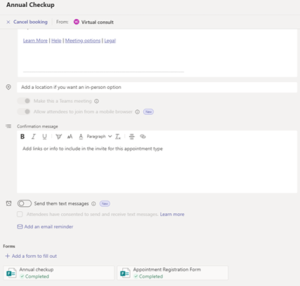
- When Form responses are submitted by the attendee, staff can view the status of submission in the appointment details form within Bookings Teams app.
- This feature is not supported through Bookings web app. Microsoft is working on bringing this capability to the web app in their future releases.

Linking a Form to your service type
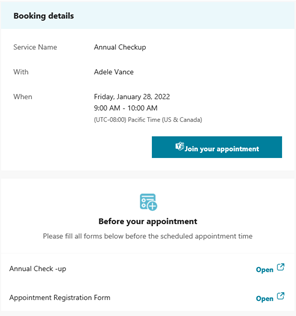
Forms included in an e-mail confirmation to the attendee
Once an attendee submits a response, staff can view the status of the submission in the appointment details form within the Bookings app in Teams
Info.