Some courses that you complete in BuckeyeLearn may have course ratings and reviews enabled. This will let users who have completed the training to provide a one through five star review and feedback for the course. Course ratings and reviews are available for online classes only. Not all courses will have this functionality enabled.
Course ratings and reviews are used to:
- Gather constructive feedback on the course content, structure, and delivery
- Highlight aspects of the training that learners found particularly effective or beneficial
- Identify areas where the training could be improved to enhance the learning experience
- Provide insights to course developers, subject matter experts, and unit leadership for ongoing development and refinement of eLearning in BuckeyeLearn
Review Standards
To maintain the quality and relevance of the reviews, reviews should focus on:
- Training Content and Delivery: Reviews should exclusively address the course material, its organization, the effectiveness of instructional methods, and the overall learning experience
- Constructive Feedback: Comments should be constructive, offering specific examples of what was beneficial or suggesting improvements
- Professional Language: Reviews must be written in a professional manner, free of offensive language, personal attacks, or inappropriate content
- Relevance: Feedback should be directly related to the training itself. It should not include comments or complains about BuckeyeLearn as a system, the requirement to take the training, or anything unrelated to training course being reviewed
Reviews will be monitored and moderated on a biweekly basis to ensure compliance with these standards. Any review that violates the guidelines will be removed from the system.
Add a Review
- Open the course Training Completion Page for the course you want to review.
Click Rate This Training.
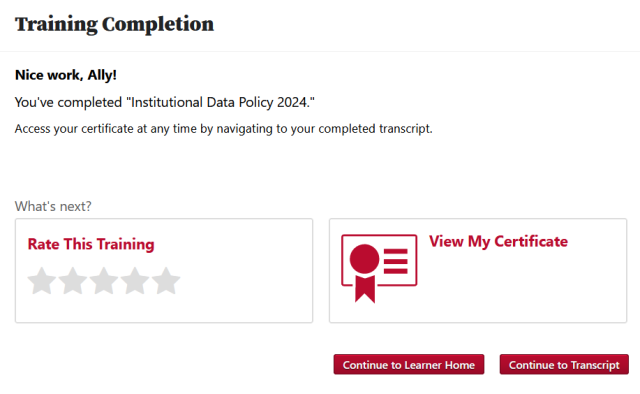
In the pop out, select a star rating, give a title for your review, and provide your feedback.
The referenced media source is missing and needs to be re-embedded.Click the Submit button
The referenced media source is missing and needs to be re-embedded..
Edit a Review
- Open the Training Completion Page for the course of the review you want to edit.
Click the down arrow icon

.
The referenced media source is missing and needs to be re-embedded.- Click Edit.
- Edit your review.
Click the Submit button
The referenced media source is missing and needs to be re-embedded..
Delete a Review
- Open the Training Completion Page for the course of the review you want to edit.
Click the down arrow icon
.
The referenced media source is missing and needs to be re-embedded.- Click Delete.
View Reviews
To view all ratings and reviews for a course
- Search for the training.
- Click the course title.