Items on the Properties page are the same for all sessions. This is the basic information that a learner will see when they view your event.
Review each numbered area to learn more about the page.
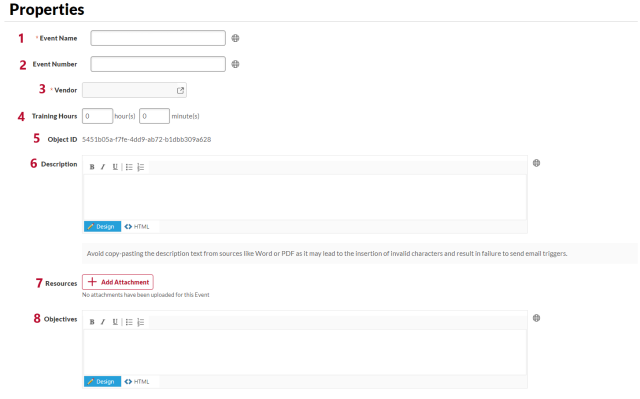
- Event Name: The name of the course. Review the Content Standards for requirements for course names. If you have any questions about how an event should be named, contact your OU admin. This field is required.
- Event Number: An optional identifier for your course. Contact your OU admin to review your area’s policies about this option.
- Vendor: Click the search icon to select the correct vendor. This field cannot be changed after the event has been saved. This field is required.
- Training Hours: The length of the course in hours and minutes.
- Object ID: The identifier that is automatically created for this event.
- Description: What the course is about. Review the Content Standards for requirements for course descriptions. If you have any questions about how an event should be described, contact your OU admin.
- Resources: Add attachments for learners or administrators.
- Objectives: The learning objective for the course. Review the Content Standards for requirements for objectives. This field is required by the Content Standards.
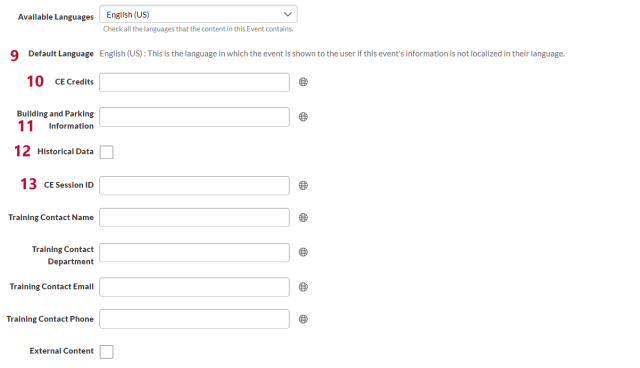
- Available Languages/Default Language: These fields are not used at Ohio State.
- CE Credits: Use this field to track continuing education. This field is a reporting field and learners do not see it. Contact your OU admin to review your area’s policies about this option.
- Building and Parking Information: Use this field to provide short instructions about the building or parking information if all sessions will be held in the same location. This field is limited to 100 characters. Contact your OU admin to review your area’s policies about this option.
- Historical Data: This field is a reporting field and learners do not see it. Contact your OU admin to review your area’s policies about this option.
- CE Session ID: Use this field to track continuing education. This field is a reporting field and learners do not see it. Contact your OU admin to review your area’s policies about this option.
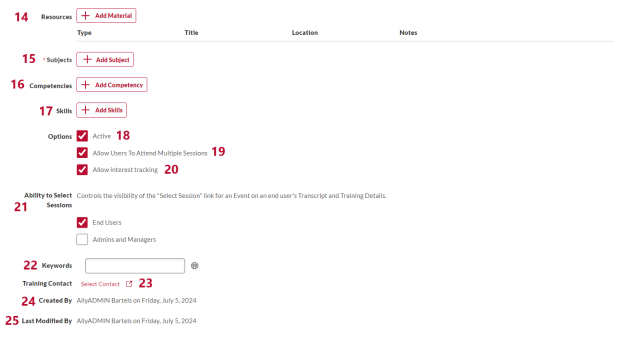
- Resources: Use this area to list resources for learners.
- Subjects: Select one or more subjects that relate to training. Learners use subjects to search for training. For help with selecting the correct subject, review the Subject Definitions. This field is required.
- Competencies: Associate this training with competencies. Contact your OU admin to review your area’s policies about this option.
- Skills: Associate this training with skills. Contact your OU admin to review your area’s policies about this option.
- Active: When checked, the event is active. This option is checked by default.
- Allow Users to Attend Multiple Sessions: When checked, learners may attend multiple sessions of an event. This option is checked by default. Contact your OU admin to review your area’s policies about this option.
- Allow Interest Tracking: When checked, learners may indicate interest in this event. This option is checked by default. Contact your OU admin to review your area’s policies about this option.
- Ability to Select Sessions: Determine who can select sessions of this event. End Users is checked by default. Contact your OU admin to review your area’s policies about this option.
- Keywords: Use this field to associate certain words, such as acronyms and alternate spellings with this event. When learners search for those words, this event will appear in the search results. Contact your OU admin to review your area’s policies about keywords.
- Training Contact: A person who can answer questions about the training. This person may be an instructor or another person in your area. Only non-admin accounts can be selected for this field. This field is required by the Content Standards.
- Created By: The administrator who created the event.
- Last Modified By: The administrator who most recently changed an event.