The Ohio State University’s centrally supported Salesforce instance.
Buckeye360 provides the university with an ever-expanding single source and 360-degree view of all university constituents and serves as our enterprise system of recruitment and engagement.
Instructional Guides
Frequently Asked Questions
General
Can I export my report results?
Exporting data from Salesforce is approved on a very limited basis and is not standard to Salesforce access. The CRM Team vets all data exports and ensures email, mail and phone consent filters are applied. If data is needed for a recruitment request like sending a piece of direct mail, call list or other project that is not related to bulk email, please fill out our College Data Request Form.
Email addresses are never exported for any reason from Salesforce. Emails can be sent via a case email in the CRM (1:1 email) or bulk email (1:Many) via SFMC. For additional information please email crm-marketing@osu.edu or buckeye360support@osu.edu
Content Management
What if a contact exists in SIS but not in Salesforce?
Create the contact in Salesforce and include the name and OSU email in any of the email fields.
Email the OSU ID and contact information to the Salesforce team at buckeye360support@osu.edu. They will add the OSU identifiers to Salesforce.
Event Management - Blackthorn
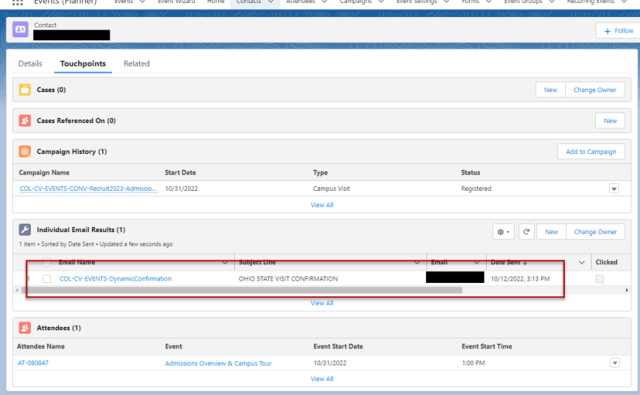
Did an attendee get an email confirmation?
Check the contact record under IERs (Individual Email Result) and look for Dynamic Confirmation.
Why is my event not listed with other events on the public website?
Check for a few things:
- Your event is associated with an event group.
- Your event is published.
- Your event status is “Active.”
- Your event has remaining capacity.

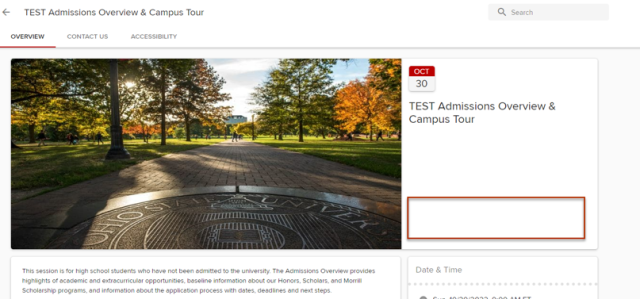
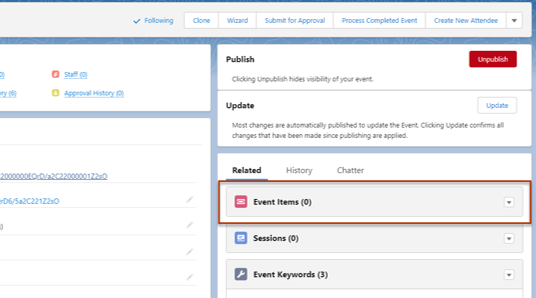
Why is there no “Register” button on my event?
Your event does not have an event item.
Help
Campaigns and Communications: CRM-marketing@osu.edu
Event and Session How To: buckeye360support@osu.edu
Access Requests: buckeye360support@osu.edu
Custom Forms/Solutions: buckeye360support@osu.edu