Why we require a suppression list for Recruitment Email sends in SFMC
To ensure that we are not attempting to deliver email to bad email addresses for Recruitment, we will now require that all Recruitment email sends utilize an annual suppression list. For each target term, the Suppression list will have the Recruit year in it. For example, if you are targeting Autumn 2027 or any 2027 term for recruitment, you must use the Recruitment Suppression List 2027 list to ensure you are not delivering to bad emails. Any typos, hard bounces from previous email sends that are reported or other population-based lists that need suppressed will be added to this suppression list. This suppression also includes parent, student, grad and professional, counselor, as well as undergraduate emails that should be suppressed.
Multi Step Journeys & Suppression
All recruitment emails are required to be sent via multi step journeys in Salesforce Marketing Cloud. This instructional guide will show screenshots selecting the suppression list within the multi step journey as a result of that requirement.
- Log into Salesforce Marketing Cloud and click into your multi step journey
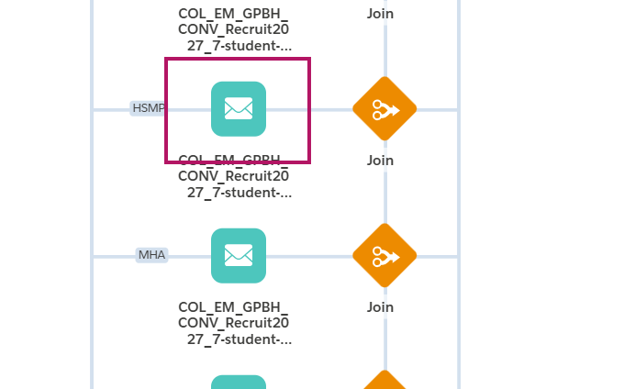
Click the email tile in your journey and ensure your email and sender profile is already selected
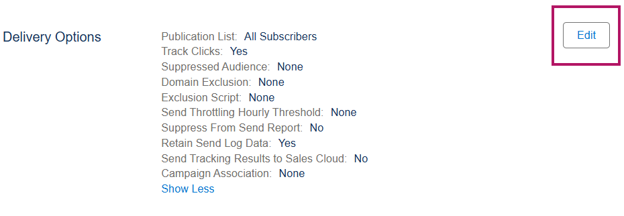
Go to Delivery Options and click Edit
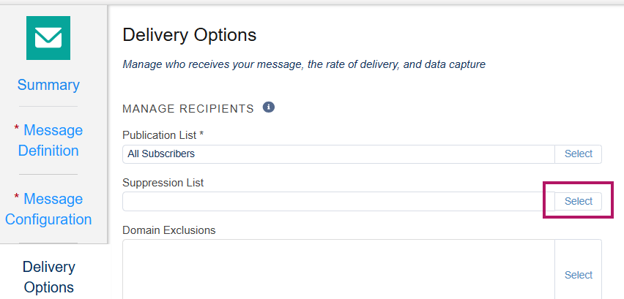
Click Select in the Suppression list under manage recipients
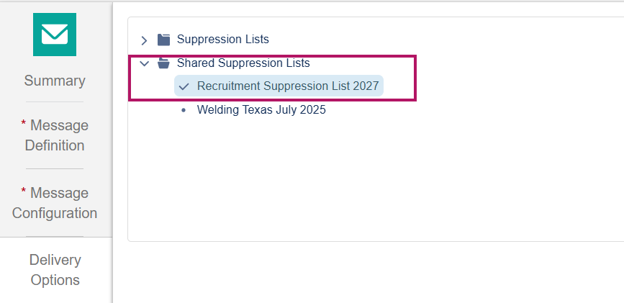
Select the Recruitment Suppression List 2027 under the Shared Suppression Lists
Key things to remember
- The suppression list must be selected for every email in your journey
- Suppression lists can be added after a journey is active, but it is preferred you add it before activation
- Hard bounces, typos, and other populations that must be suppressed will be added to this list
- We will run the list of bad emails biweekly to ensure we are checking if contacts have new emails that have been loaded to Salesforce that could work and remove them from the suppression if we are able
- Unsubscribes are not added to the suppression list because they are not syncing to Marketing Cloud, so there is no need to add them to the suppression
- If you create new versions of your journey or make copies for some reason, you’ll need to read the suppression list to each email
- Adding the suppression list helps prevent negative impacts to our deliverability as an institution