Submitting a Grade Assignment or Change Form Online

Instructions from the Office of the University Registrar for submitting a grade assignment or change online.

Submission Types

  • Grade Assignment: This form is used to submit a missing grade if the Grade Roster (Enter/Post Grade) instructions cannot be used because the Grade Roster is no longer available.
  • Grade Change: This form is used to change a grade that has been posted.

Access the Online Form


Critical Note

The Official Grade information available on this form is a day old. If you are trying to request a change to a grade that was posted today, please come back tomorrow when the Official Grade information will be available.


Critical Note

Once a grade has lapsed it cannot be returned to an I or changed to an IX. A Grade Change Form must be submitted when a final grade is determined.

  1. From the University Registrar website, by selecting Forms (faculty/staff) from either the Faculty Support or Staff Resources menu.
  2. Sign in using your Ohio State ID (lastname.#) and password.
  3. Open the Grades accordion to access the form, instructions, and notes.
  4. Select the Online Grade Assignment or Change Form link.
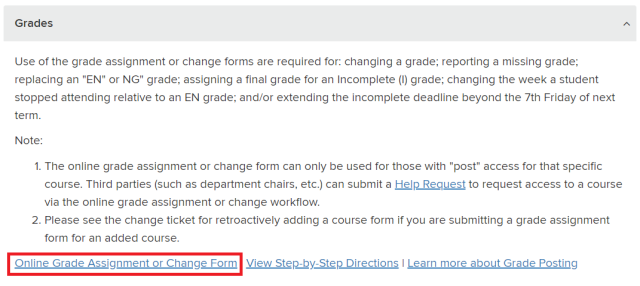
    Frequently Used Forms page
  5. If you have access as both an instructor and as an authorized submitter,  you will be prompted to select whether you are requesting changes as yourself or requesting changes for someone else.

    Grades Role Selection page

Complete the Form

  1. Select the appropriate Term from the drop-down menu to view a list of classes to select from.
  2. Choose the appropriate Class.
  3. Select the checkbox(es) for the student(s) for which you wish to change or assign a final grade.
  4. Select the Next button link.
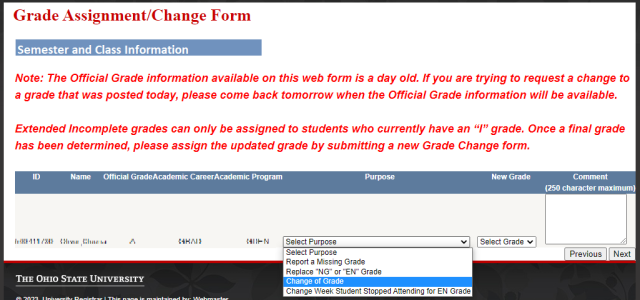
  5. Select the appropriate reason for the change from the Select Purpose drop-down menu.
  6. Select the new grade from Select Grade drop-down menu.
 

Critical Note

Extended Incomplete grades can only be assigned to students who currently have an "I" grade. Once a final grade has been determined, please assign the updated grade by submitting a new Grade Change form.


Critical Note

Once an "I" grade has lapsed it cannot be returned to an I or changed to an IX. The lapse deadline is always noon on the 6th Saturday of the subsequent term. A Grade Change Form must be submitted when a final grade is determined. A student's grade should reflect the grade earned at the time of the grade lapse. If not, a grade change can be submitted to update it.

  1. Add a Comment up to 250 characters.
  2. Select the Next link button.

    Grade Change Options page
  3. Review the information and, if accurate, select Finish.

 

Critical Note

Select Previous if information for the selected student needs to be corrected. If you wish to go back and enter more grade changes for additional students, you may do so after selecting Finish.


Helpful Note

There is a Enter more grade changes link to enter more grade changes.


Critical Note

Your request does not occur immediately. It may require multiple levels of approval, and processing times may vary.

Additional Grade Change form link