Instruction from the Office of the University Registrar for entering and posting grades through the Grade Roster.
- Navigate to the Grade Roster page.
- Complete the following Search criteria:
- Term
Class Nbr
- Select Search button link to view the Grade Roster page.
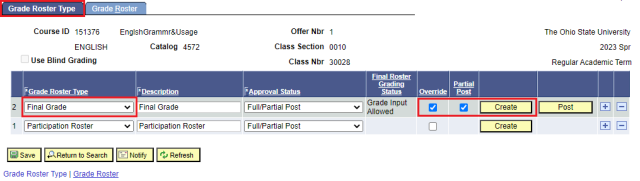
- Verify Final Grade is the Grade Roster Type.
- Select the Partial Post checkbox.
- Select the Create button link.
Select the Grade Roster tab to view the Grade Roster page.
Enter Grades
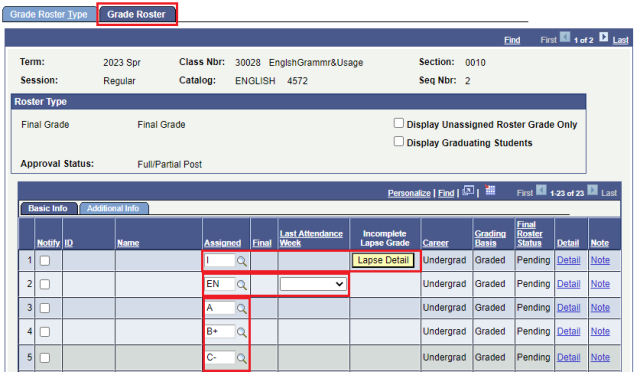
Enter grades for students in the Assigned column noting details of Incomplete (I) and Failure-Non Attendance (EN) grades below.
(I) Incomplete Grade
Additional steps are required if an incomplete grade is assigned.
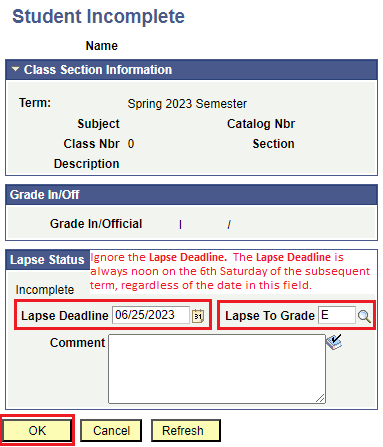
- A Lapse Detail button link will appear. Select the link to open the Student Incomplete page.
- Note the following fields in the Lapse Status section:
- The Lapse Deadline date will be prefilled but may not be accurate and should be ignored. The date is not flexible. If the date is changed, it will be ignored.
- Enter the current earned grade in the the Lapse To Grade field.
- Select the OK link button to save the Student Incomplete page. The Lapse Grade is now scheduled to post the 7th week of the subsequent term.
- If an additional extension is approved, a Grade Change Form must be submitted before the deadline of noon on the 6th Saturday of the subsequent term to change the I grade to an Incomplete Extension (IX).
If the final grade is different than the Lapse Grade, the deadline to enter an alternate final grade must be submitted before the deadline of noon on the 6th Saturday of the subsequent term using the Grade Change Form.
EN- Failure For Non-Attendance Grade
- If an EN grade is assigned, a box will appear in the Last Attendance Week column. Select the week the student last participated. If the student never attended, select Before Term.
Once all grades and all details for Incompletes (I) and Failure for Non-Attendance (EN) grades have been entered, select the Save button link.
Post Final Grades
- Select the Grade Roster Type tab.
- Verify the Approved Status is set to Full/Partial Post.
- The Approved status can only be used when every grade is posted.
- If there are students with an unpaid balance on the roster, you cannot post grades in the Full Post Only status.
- The No Post-View Only status is useful when one person is entering grades to later be checked and posted by the grade roster.
- Grades cannot be posted in the No Post-View Only status.
- Select the Post button link to post.
- Select the Grade Roster tab. The Roster Grades are no longer available to be entered or changed and the Official Grade column is populated., indicating as immediate feedback that the grades are now part of the permanent academic record.