This guide demonstrates how to navigate Student Health Insurance enrollment pages in the Student Information System. Please visit the Student Health Insurance web site (shi.osu.edu) for details on insurance requirements, types of insurance, fees, deadlines, and coverage options.
Select Select/Waive Coverage from My Buckeye Link.
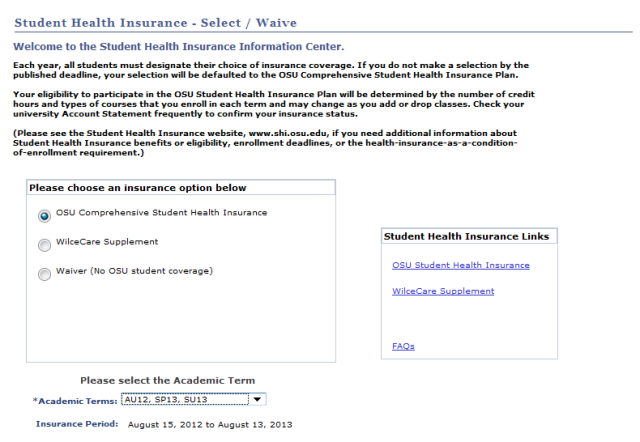
- Select an insurance option.
- For more information about insurance options, click the appropriate link in the Student Health Insurance Links box or go to shi.osu.edu.
- OSU Comprehensive Student Health Insurance: Enroll in the Comprehensive Student Health Insurance plan which includes medical, dental, vision and prescription coverage.
- WilceCare Supplement: Waive out of the Comprehensive Plan and purchase the WilceCare Supplement, which provides coverage at the Wilce Student Health Center for students already insured by other third-party plans.
- Waiver (No OSU student coverage): Waive out of the Comprehensive Student Health Insurance plan and WilceCare Supplement.
- For more information about insurance options, click the appropriate link in the Student Health Insurance Links box or go to shi.osu.edu.
- Select the Academic Terms and select the Next button.
- If you selected the Waiver or WilceCare options, you will jump to the Waiver Information page.
- Otherwise, you will continue to the Elections and Dependents page.