Online Residency Form

The Online Residency form allows you to apply for Ohio Residency for tuition purposes.

Navigation:

My Buckeye Link - Personal Information section - other personal... drop-down menu - Residency

  1. Select Residency from the personal .... drop-down menu and click 

    My Buckeye Link Jump Link button

The Residency Reclassification Form appears. Read the important information on this form.
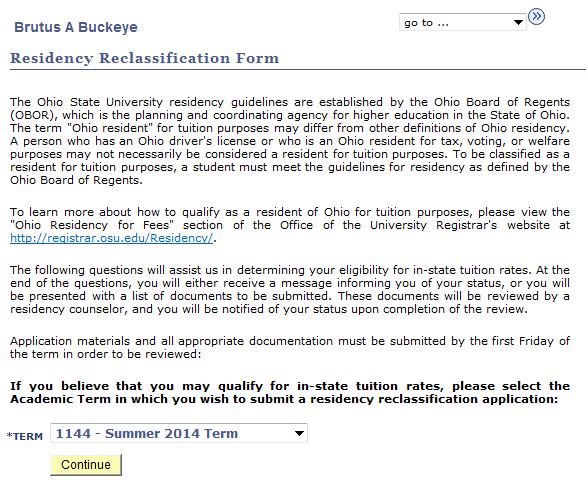
My Buckeye Link Residency Reclassification Form
  1. Use the drop-down menu at the bottom of the page to select the Term for which you intend to apply.
  2.  Select 

    Continue button
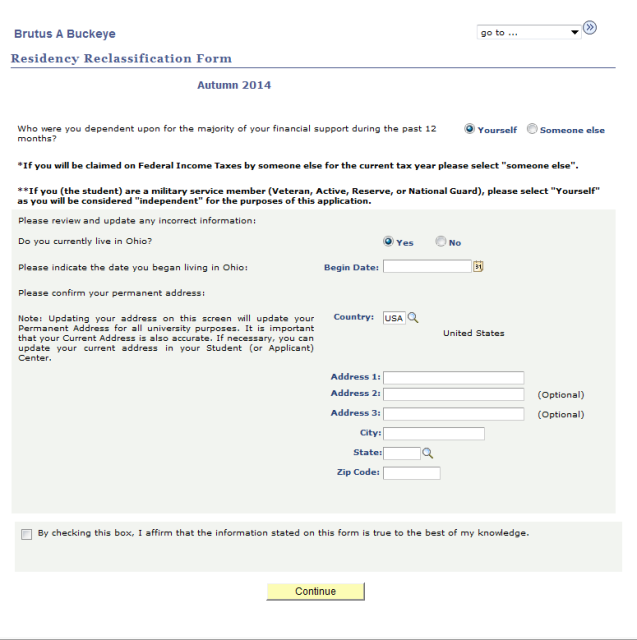
    Residency Classification Form update and affirm information
  3. Read through the information and update any information.
  4. Check the box to affirm that the information on the form is true to the best of your knowledge.
  5. Select 

    Continue button

     .


Helpful Note

You may be directed to answer a number of questions through the Residency Reclassification Form. Select

Save & Continue button

after each question. After completing the set of questions, you may see a Document List. This will be visible if you need to submit documentation prior to the processing of your residency request.

Residency Classification Form update and affirm information

Visit the Ohio Residency for Tuition page to obtain additional information regarding Ohio Residency for Tuition Purposes.