The Financial Aid: Select Aid Year to View page will appear.
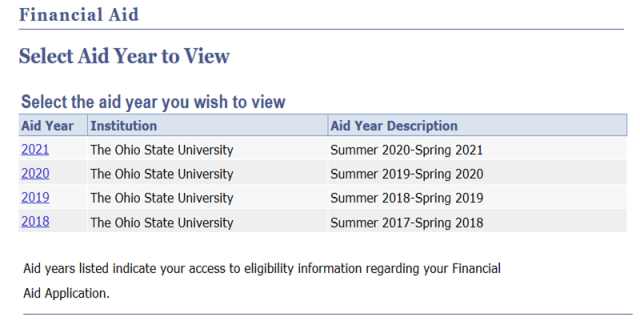
- Select the appropriate Aid Year. The To Do List will appear.
If desired, select the SFA Status or Aid Summary tab to skip to information on those pages.

To Do List tab descriptions
To Do Items must be completed before the aid will be awarded.
Status:
- Each item will initially have a Status of "Initiated", meaning the item is required but has not yet been received.
- When the item is received by the Office of Student Financial Aid, the Status changes to "Received".
After the item has been received and processed, the Status changes to "Completed". Processing of the financial aid award will not continue until the Status is "Completed."
Due: Receipt deadline for priority aid consideration. If all items are not received by the Due date, you may lose eligibility for some aid.
Received: Date the To Do Item was received by the Office of Student Financial Aid
Select the SFA Status tab.
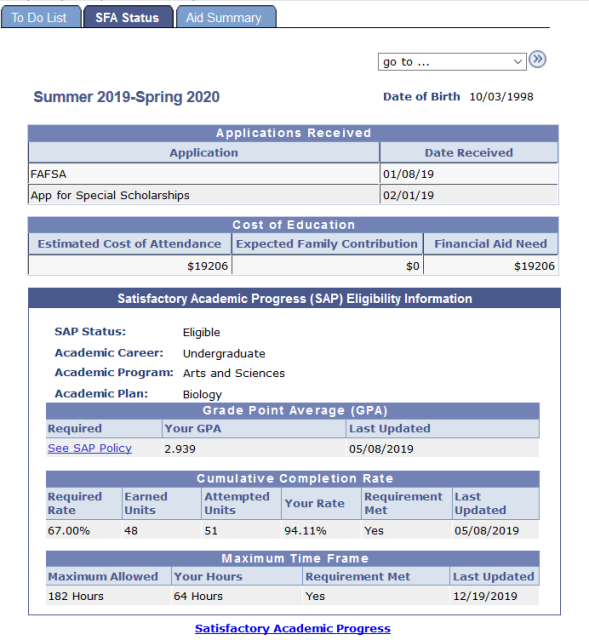
SFA Status tab descriptions
Application: FAFSA (Free Application for Federal Student Aid)
Date Received: Date FAFSA received by U.S. Department of Education process
Estimated Cost of Attendance: Budget used to determine financial aid eligibility; includes tuition and fees, books and supplies, and living expenses
Expected Family Contribution: (EFC) Index from your Student Aid Report (SAR)
Financial Aid Need: Difference between Estimated Cost of Attendance and Expected Family Contribution
Satisfactory Academic Progress (SAP) Eligibility Information: Indicates a student’s successful completion of coursework that is applied to a certificate or degree program. For additional information, go to the SAP overview.
Click the Aid Summary tab.
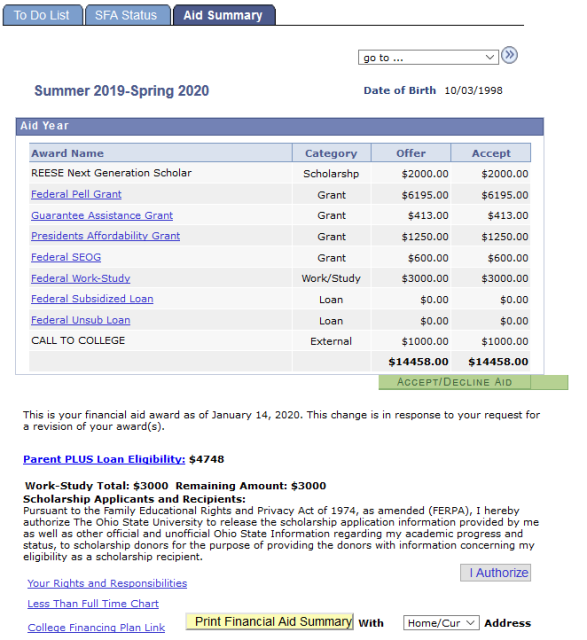
Aid Summary tab descriptions
Aid Year: Summer 2019- Spring 2020
Aid Name:
- Select Aid Name to open a new window with more information about that aid.
- Select Accept/Decline Aid to accept or decline financial aid not automatically accepted. Refer to the Accept/Decline Aid reference for more information.
Scholarship Applicants and Recipients: Authorization of Family Educational Rights and Privacy Act of 1974 (FERPA). Select the I Authorize button to allow the Student Financial Aid office to share your information with scholarship providers external to Ohio State.
Your Rights and Responsibilities: Opens the Student Rights Responsibilities and Disclosures page.
Less Than Full Time Chart: Opens a new window containing the Aid Eligibility Chart for adjustment from full-time to reduced hours through the end of refund period.
College Financing Plan Link: A standardized award letter designed to simplify the information prospective students receive about costs and financial aid so they can easily compare institutions and make informed decisions about where to attend school.
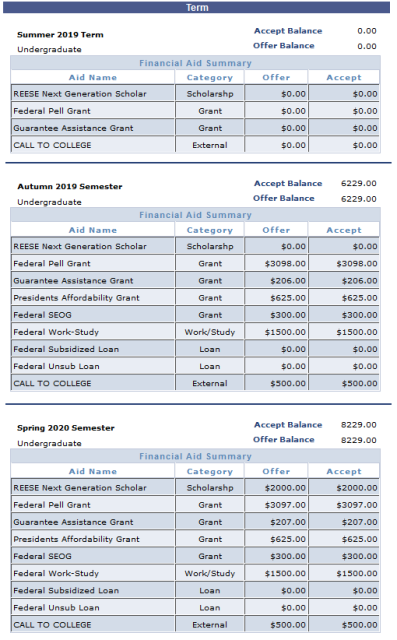
Term section: lists the amount awarded per term and award type for the displayed aid year. There will be one sub-section for each term in the aid year.
Print Financial Aid Summary: allows you to print an Official Summary of your awards.
- [Optional] Select “Campus” or “Current” as the Address.
- Select Print Financial Aid Award Summary button.
- Select the Yes button to the Security Information Question.
- Select the Print button.