About the Student Information Release
The federal Family Educational Rights and Privacy Act of 1974 (FERPA) governs the release of educational records to third parties. By default, Ohio State can only communicate with you, the student, regarding specific details about your account, such as amount owed for tuition and fees or status of a refund. To release account-specific information to someone other than you, you must grant authorization by completing the student information release (SIR) in your My Buckeye Link account.
Only you, the student can complete a student information release; Ohio State will NOT release account-specific information to anyone else in any other way.
Complete Your Student Information Release
- Navigate to buckeyelink.osu.edu and click My Buckeye Link in the Quick Links section at the top right of the page to log into your student account. Use your Ohio State name.# and password as your log-in credentials.
- Click the Personal Information tile, then choose Student Information Release from the left sidebar menu.
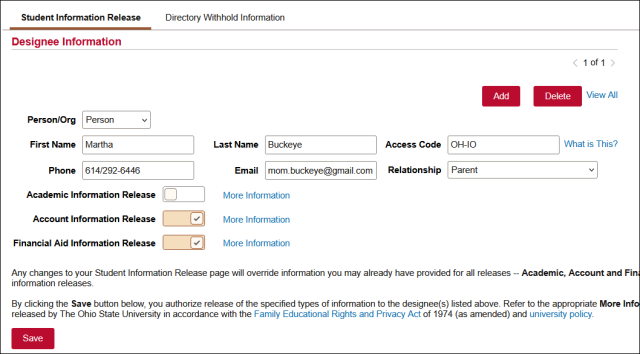
- Complete the following fields – First Name, Last Name, Access Code, Phone Number, Email, Relationship. When contacting the university, staff will ask for this information to verify the authorized contact’s identity; their responses must match what is listed to release account-specific details
- Confirm what types of information Ohio State is allowed to discuss with your authorized contact by switching the corresponding toggle button to “On.” You can choose one, two, or all three.
- Academic Information – includes program (major/minor), class information, schedule, grade point average, and grades.
- Account Information – includes details about charges and payments on your account
- Financial Aid Information – includes details about your financial aid award package
- Click Save. The student information release becomes effective immediately.
Important Information
- Only students may access their My Buckeye Link account. Ohio State does not offer a parent or family “portal” that allows direct access to the account, nor does designation as an authorized contact grant direct access to the account.
- You may add as many authorized contacts to your student information release as you wish. You may also remove an authorized contact at any time.
- Authorized contacts should be prepared to share identifying information and their access code when contacting Ohio State.
- Some, but not all email notifications about student academic business are sent to contacts who have been authorized on the SIR. You should communicate regularly with your authorized contacts to ensure that important information is shared appropriately.
Withhold Directory Information
You have the right to withhold the release of directory information, details about you which may be visible in the Search Ohio State directory.
Directory information includes:
- Name
- Local and home addresses
- Phone number
- Enrollment status
- Program of study
- Primary campus attended
- Participation in officially recognized sports and activities
- Weight/height of intercollegiate athletic team members.
Not all directory information is included in Search Ohio State; you can see what is included by default by completing a search.
Some information is always considered releasable, regardless of whether you have chosen to withhold it. These include:
- Email address
- Previous dates of attendance
- Degrees and awards received
- Previous education institutions attended
To withhold your directory information:
- Navigate to buckeyelink.osu.edu and click My Buckeye Link in the Quick Links section at the top right of the page to log into your student account. Use your Ohio State name.# and password as your log-in credentials.
- Click the Personal Information tile, then choose Student Information Release from the left sidebar menu.
- Click the Directory Withhold Information tab.
- Switch the “I wish to withhold the release of my Directory Information” toggle to On.
- Click Save.