Keep your address information up to date to ensure Ohio State maintains accurate student records and can send important communication to the correct location. You can update the following addresses yourself:
- Permanent Address – this is where you permanently reside
- Home/Current Address – this is where you reside while you are taking classes; sometimes this is the same as your permanent address, sometimes it is different.
- Student Physical Location Address – this is where you physically reside while you are taking online classes
Other addresses, including Residence Hall Address and SEVIS – F&J Visas Only Address, are populated by the system and cannot be changed.
View Your Addresses in My Buckeye Link
- Navigate to buckeyelink.osu.edu and click My Buckeye Link in the Quick Links section at the top right of the page to log into your student account. Use your Ohio State name.# and password as your log-in credentials.
- Click the Personal Information tile, then choose Addresses from the left sidebar menu.
Important Information
- During the academic year (Autumn and Spring semesters), paper check refunds generated from excess financial aid are sent to your Home/Current address. During Summer term, they are sent to your Permanent address.
- When taking online classes, you will be prompted to update your physical location address. For accreditation and compliance purposes, Ohio State must annually report data on the location of its online students in all states.
Add a New Address
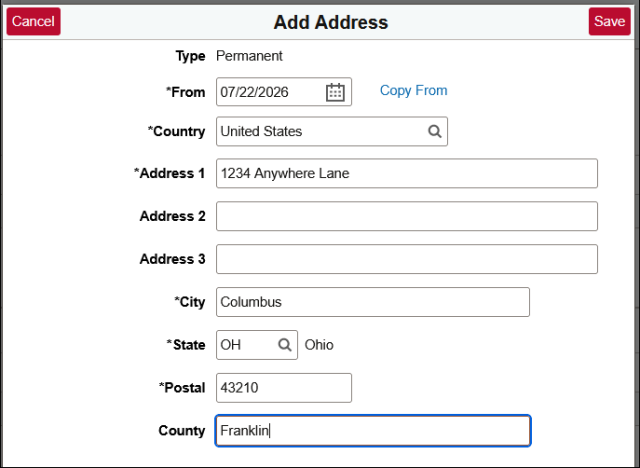
- Find the address type that you want to add (Permanent, Home/Current, or Student Physical Location) and click the Add button in the top left corner – this will open a pop-up window where you can enter the new address information.
- Enter your new address – by default, the address will be effective the next business day, unless you change the From date to one further in the future. (You cannot enter a date in the past.)
Click Save. Your changes will display right away in the corresponding section.
Change an Existing Address
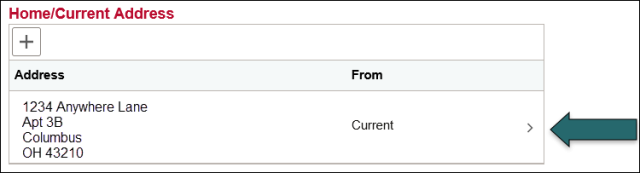
- Find the address type that you want to change (Permanent, Home/Current, or Student Physical Location) and click the arrow to its right to open it.
In the pop-up window, enter any needed changes, then click Save.
Helpful Tips
Correctly entering your address is crucial to ensure that paper mail sent to you from Ohio State, including paper refund checks, is addressed appropriately. Follow these tips to avoid your correspondence being returned by the USPS as undeliverable.
- Address 2 and 3 are optional. Use Address 2 for apartment/unit numbers. Do not use Address 3. Do not duplicate what you put in Address 1 on any other address line.
- Confirm the zip code you enter matches the city and state. Mail cannot be delivered to an address with mismatched city and zip code.
- Put the number assigned to the house or apartment building before the street name.
- County is a region within the state (for example, Franklin County), not a country (for example, United States of America)
- Check and update your address regularly, at minimum once per term. Also be sure to make updates each time you move – for example, when you go home for the summer or move to a new apartment off campus.