About Making Online Payments
Paying your tuition and fees online is the fastest and safest way to keep your account up to date. Most online payments post immediately to your statement of account.
Online payment options include:
- Electronic Check (ACH) – use your bank’s routing and account numbers to make a no-fee payment directly from your checking or savings account.
- Credit or Debit Card – pay with MasterCard, Visa, Discover, or American Express in U.S. dollars. A non‑refundable service fee is charged by the payment processor.
- International Payments – families paying from outside the U.S. can send funds through Flywire or Convera.
Important Information
- By default, only you, the student, are authorized to make payment toward your bill. If you wish to have someone else pay on your behalf, you must create an Authorized Payer account for them. Learn more about Authorized Payers.
- This job aid details the process for paying current term tuition and fees. If you need to pay past due tuition and fees for a prior term, visit https://go.osu.edu/studentcollections.
- Ohio State offers the option to pay your tuition and fees in installments. Learn more about the Tuition Option Payment Plan (TOPP).
Pay Online - Electronic Check, Debit or Credit Card
- Navigate to buckeyelink.osu.edu and click My Buckeye Link in the Quick Links section at the top right of the page to log into your student account. Use your Ohio State name.# and password as your log-in credentials.
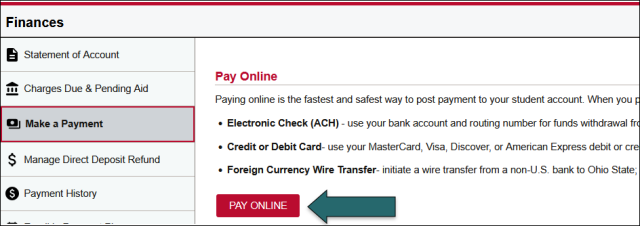
- Click the Finances tile, then choose Make a Payment from the left sidebar menu.
- In the “Pay Online” section click the Pay Online button – this will transfer you to Ohio State’s online web payment portal
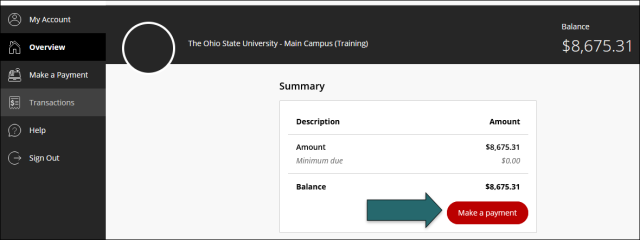
In the online web payment portal:
- Click the Make a Payment button.
- Enter the amount you wish to pay – you can enter up to the total balance, but you cannot enter an amount over the total balance.
- Check the Amount box if you wish to pay the total balance.
- Click Checkout.
Choose how you would like to pay – New Bank Account or Credit or Debit Card. (Foreign currency, the third option, is detailed in the Make an Online Payment – Foreign Currency section.)
New Bank Account
- Account Holder Name – enter the name of the person who holds the account as it appears on the account.
- Account Type – select Checking or Savings
- Routing Number – this is the unique identifier for the bank from which funds will be sent. You can find this in your online banking app or at the bottom left corner of a paper check, if you have one.
- Bank Account Number – this is the unique identifier for your account. You can find this in your online banking app or in the bottom middle of a paper check, if you have one.
- Confirm Bank Account Number – re-enter the account number
- Optional: Save Bank Account for Future Use – check this box if you know you will be using this account to pay tuition again and you want to save time in the future.
- Check the “I Agree” box – to agree to the bank account terms and conditions, then click Continue.
- Review and Submit – review the information you entered to ensure it is accurate. Once you are satisfied, click Pay. The green checkmark on the screen following submission indicates the process has successfully completed.
Credit or Debit Card
- Note that a non-refundable service fee is assessed by the payment processor for credit card payments. This is not an Ohio State charge. It is calculated as a percentage of the total amount you are paying and will display at Step8, Review and Submit.
- Card Number – enter your credit or debit card number.
- Expiration Date – enter the expiration date associated with your card.
- Security Code – enter the security code for your card.
- For Visa, Mastercard, and Discover, the three-digit code is located on the back of the card; for American Express, the four-digit code is located on the front.
- Zip/Postal Code – enter the zip code associated with your card.
- Optional: Save Card for Future Use – check this box if you know you will be using this account to pay tuition again and you want to save time in the future.
- Check the “I Agree” box – to agree to the bank account terms and conditions, then click Continue.
- Service Fee Acknowledgement – check the box to agree to the service/convenience fee. The fee is calculated as a percentage of the total amount you are paying. It is non-refundable and paid directly to the payment processor, not Ohio State. Click Continue.
- Review and Submit – review the information you entered to ensure it is accurate. Once you are satisfied, click Pay. The green checkmark on the screen following submission indicates the process has successfully completed.
Pay Online - Foreign Currency
Ohio State offers two options for foreign currency conversion to pay tuition and fees – Flywire and Convera. Both providers support multiple currencies, competitive exchange rates, local bank payments, and online tracking. Ohio State does not charge transaction fees, although your bank may.
Foreign currency payments take between 5 and 10 business days to post to your account from the time you initiate the payment with your home bank.
- Follow Steps 1 and 2 in Pay Online – Electronic Check, Credit or Debit Card
- In the “International Payments” section, choose either the Flywire or Convera button.
Flywire
- Pay from China, India, or Korea
- General step-by-step instructions for other countries
Convera