Path.
- Navigate to the Faculty Center page.
By default, this page displays all classes scheduled in the current term.
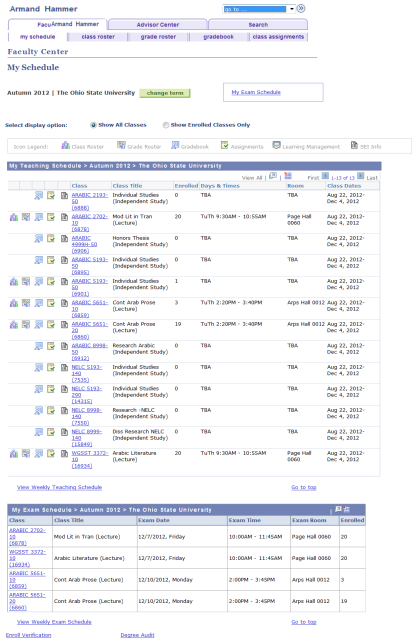
- Select View My Weekly Teaching Schedule.
- Review your Weekly Teaching Schedule.
- Notice the days, times and room assignments for the classes shown.

- If you wish to change the dates or times displayed on your Weekly Schedule:
- Type or select a new date as the Show Week of to change the dates displayed.
- Type a new Start Time and/or End Time to change the times displayed.
Select
after entering your new date and/or time(s).
Select

or

to browse your Weekly Schedule week-by-week.
Select

to return to the first Faculty Center page.
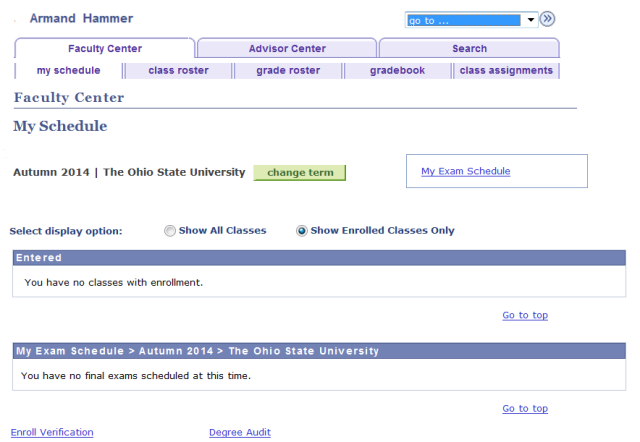
Select Only Classes with Enrollment to limit display to only those classes with enrolled students.
- In the illustration below, there are no classes with enrollment in the specified term for this faculty member so no results are returned.
To view a different term, select

. The Select Term page will appear.

Select your desired Term and select

Your schedule will display for the selected term.