The copy feature is best used when activities are substantially similar.
From the Listing Privacy Impact Assessments page:

- Select a PIA record to copy.
- Click the Edit button

.
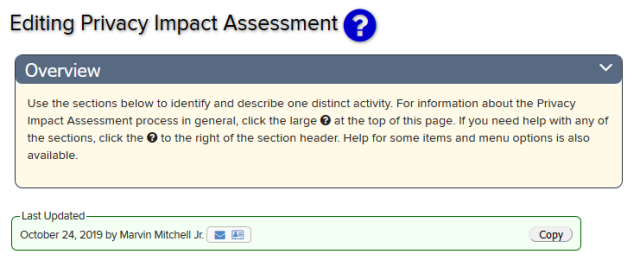
The Editing Privacy Impact Assessment page of the Privacy Impact Assessment you have selected will appear.
Select
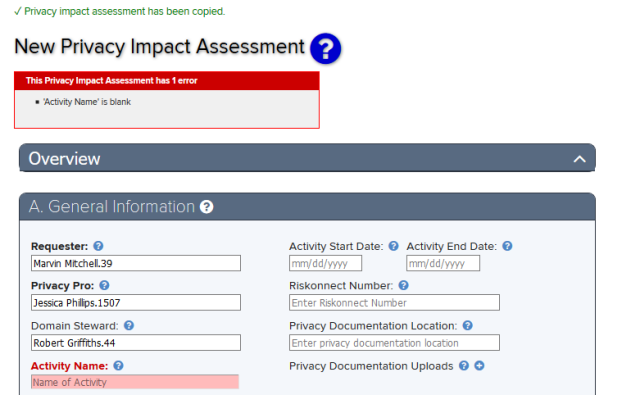
- Type a new Activity Name in the Activity Name Field box.
- Enter additional changes to the inventory record as desired.
Select the Save button

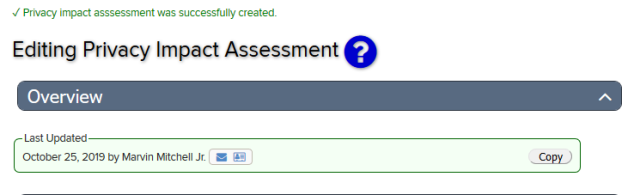
The message “Privacy Impact Assessment registration was successfully created” will appear at the top of the Editing Privacy Impact Assessment page.
Privacy Impact Assessment Inventory Help
Select the PIA Help Icon

located at the top of the Editing PIA Inventory page to learn more about the PIA and how to prepare for and create an OSU PIA Inventory Record.
Help text is available throughout the PIA Inventory tool, select the question mark icons

.
If you experience any issues as you are using the tool, please email security-integrations@osu.edu or contact the IT Service Desk.