Use the Manage page to access all documents that you have sent, received, and are preparing to send.
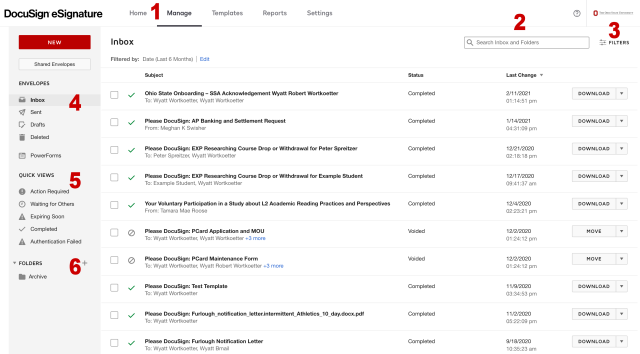
1. Manage link
Use the Manage link to access the Manage page from anywhere in eSignature.
2. Search box
Search for documents by name, sender name, recipient name, recipient email, and envelope ID. To search, type your search term, then press the Enter key.
3. Filters
Use filters to limit your search results. You can also use filters to return results without a search term.
4. System folders
View your documents in your inbox, sent, drafts, deleted, and PowerForms folders.
5. Quick views
View only those documents that have action required, are waiting for others, are expiring soon, are completed, or where authentication failed.
6. Folders created by you
View documents you have sorted into folders you have created. Click the plus icon to create folders.