The To Do List houses items that need to be completed or actions that need to be completed by a specific date. Currently, the Student Financial Aid, University Registrar, Admissions offices and Student Health Insurance utilize To Do lists.
Path.
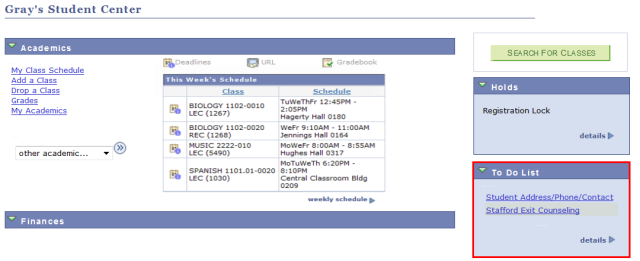
Select

to view more information about your To Do List.
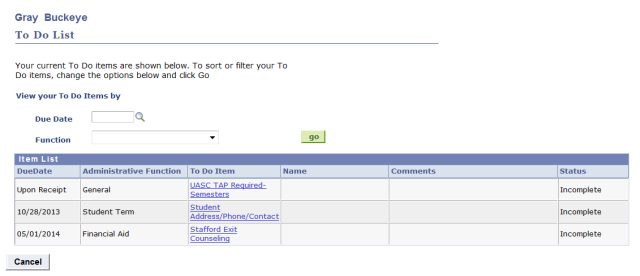
- Optional: In the View your To Do Items by section, look up and select a Due Date or a Function to filter your Item List.
- Select any To Do Item to view details about that item.
- Items that have no specific Due Date are marked "Upon Receipt."
- Administrative Function indicates which office originated that To Do Item.
- Many To Do items will not have a Name or Comments.
- Specifics vary depending on the office that created the item.
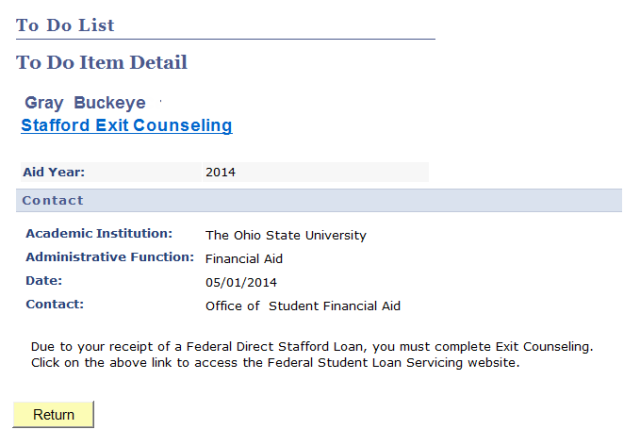
The To Do Item Detail may display information such as:
- A link to a PDF or online form, or a page with more information
- Academic Institution: (this will always be "The Ohio State University")
- Administrative Function: (the office that originated the To Do item)
- Date: the To Do Item was originated
- Contact: may display the name of the office that originated the To Do Item, a phone number, an email address, or a web site to contact for more information
- Additional instructions or information about the To Do Item
Select

to return to the To Do List.