Globus can be used to transfer files to Microsoft OneDrive/SharePoint. Connect from your computer by either installing Globus Connect Personal or sign in to the Globus File Manager website.
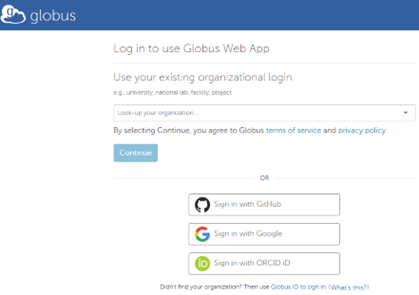
On the main landing page select “Ohio State University” from the drop-down list and enter your Ohio State username and password when prompted.
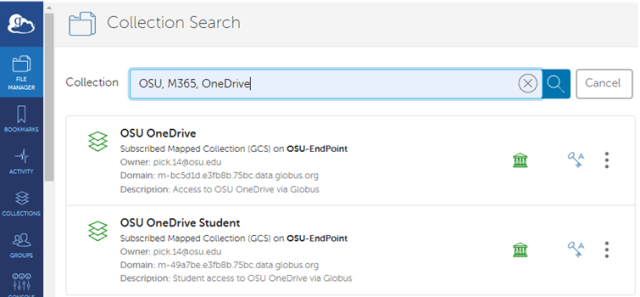
Once logged in search for the collection named “OSU OneDrive” or “OSU OneDrive Student” you can also use Keywords OSU, M365, OneDrive to search. If you are using a student account, please select the "OSU OneDrive Student" collection for all other accounts please select the "OSU OneDrive" collection.
The first time you access this collection you will be prompted for some initial account setup.
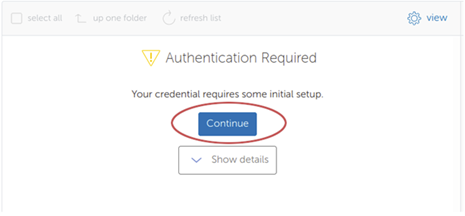
Complete the Authentication request and if prompted verify that you wish to grant access to the Collection.
Once opened the default location will be My Files, click the “up one folder” icon to see the other locations.
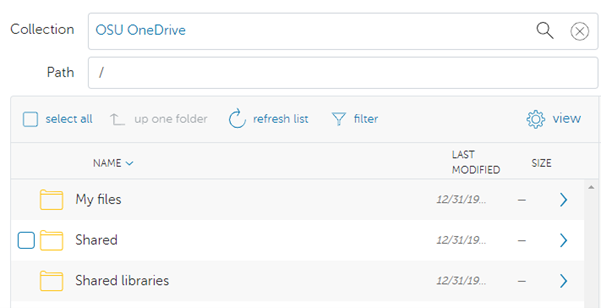
Explanation:
Path | Description |
|---|---|
/My files/ | your documents in OneDrive |
/Shared/ | documents shared with you in OneDrive |
/Shared libraries/ | documents from Office365 Groups/Microsoft Teams that you have followed in SharePoint |
*Note only those SharePoint sites that you are following will be visible in this directory.