Before you can request an Ohio State Generative AI (GenAI) account, you have to set up the financial information in Workday. Once approved, you can request the account.
Start by logging in to Workday using your Ohio State Username and Password.
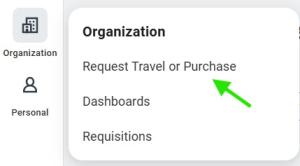
Select Request Travel or Purchase in the Organization menu.
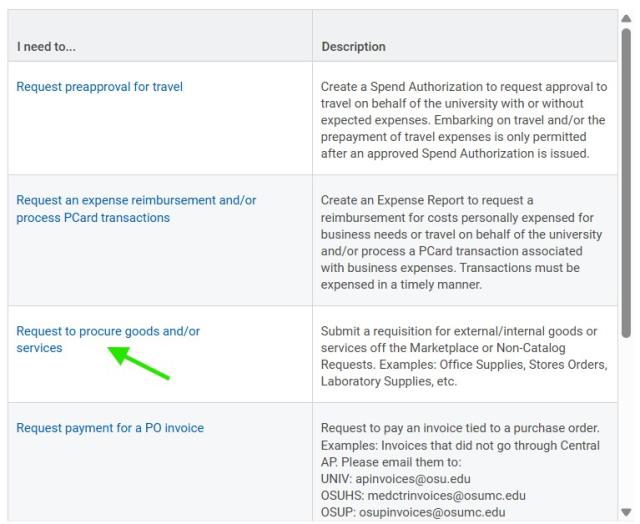
Select the Request to procure goods and/or services.
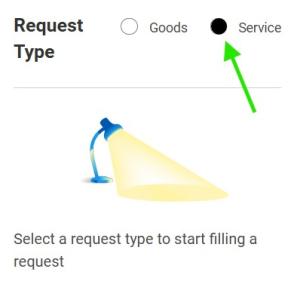
In the Ordering Methods box, Choose the “Request Non-Catalog Items” link followed by the Service radio button.
In the next section:
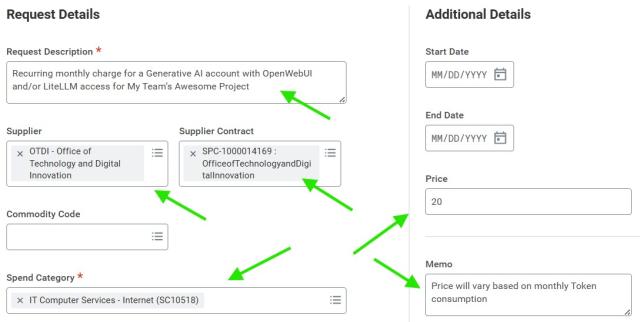
- Enter a Request Description for your purchase. Something like: “Recurring monthly charge for a Generative AI account with OpenWebUI and/or LiteLLM access for My Team’s Awesome Project" changing the underlined part as necessary.
- Set the Supplier to “OTDI – Office of Technology and Digital Innovation”.
- Set the Supplier Contract: “SPC-1000014169: OfficeofTechnologyandDigitalInnovation”.
- Set the Spend Category of: “IT Computer Services - Internet (SC10518)”.
- Set a monthly base Price of "$20", which is a suggested starting point for new users. If you know you will consume more, increase this number accordingly.
- Set the Memo to reflect, "Price will vary based on monthly Token consumption”, as true costs depend on which model(s) are used & how many tokens are consumed.
Select the Add to Cart button

.
Select the cart icon in the upper right hand corner of the window to open the Shopping Cart

.
When you are finished shopping, review the contents of the cart for completeness and select the Checkout button

.
This will throw an error, but it's just a reminder to add a 'Business Purpose' for future auditors.
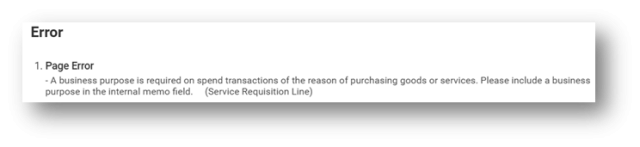
Complete the Internal Memo field, entering a well-defined, plan English business purpose for the requisition. Something like, "A Generative AI Account that allows My awesome project team access to Large Language Models (LLMs) available at the University”, changing the underlined portion as necessary.
Every expenditure must be supported by a documented ‘Business Purpose’. A business purpose should be written so an individual unfamiliar with the organization’s operation (aka: An Auditor) can understand why the transaction occurred and how it benefits the University.
Once the Business Purpose has been defined, select the Submit button

.
For more details on completing a requisition in Workday please see Create a Requisition to Procure Goods and Services.
Requesting your Generative AI Account
Once your Workday Requisition is processed into a purchase order, you’re ready to request a new GenAI Account through the ServiceNow Service Request Form. You'll find it in the 'Order Services' section, under the 'Cloud Platforms' subgroup.
Complete the form and click 'Order Now'. Within 5 business days, you should receive an email from OTDI with instructions on accessing your Ohio State Generative AI account.
If you don’t receive an email within 5 business days, please check the spam folder in your university email box or contact the IT Service Desk at (614) 688-4357.