This job aid will assist in understanding the differences between the eActivity Award Report before and after the Workday implementation.
The custom pages and processes built in PeopleSoft recorded award funding information in report-ready format. The university cannot customize Workday so an increased understanding of the data and additional work is needed to interpret and effectively use the new eActivity Award Report.
Expand the sections below to learn more about the key differences between legacy and Workday eActivity award reporting.
All e-Activity reports can be accessed from eTools
To access both the legacy reports and the Tableau reports, navigate to https://osp.osu.edu/, hover over the Resources tab, and then select eTools. Under the e-Activity heading, you will see links for both legacy data and tableau. You will also find a link for requesting access to the RAE, Ohio State’s Reporting and Analytics Environment, which is required to view e-Activity.
Multiple download options are available that affect the data downloaded
The Crosstab download option allows you to select either Excel or CSV outputs. The CSV option is the most useful for routine monitoring because all values are listed in each row, supporting filtering, sorting, and other Excel data functions.
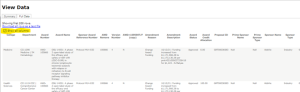
There are also two downloads of the report data accessible from the “Data” option of the Downloads tab. The Full Data tab includes the most detailed data available and will be the option most users will find more useful. Be sure to select “Show all columns” before clicking the “Download all rows as a text file” link. If you do not select “Show all columns” first, important information, such as the sponsor delta amounts, will not be included.
ALL approved award actions are included, not just funding actions
In the legacy reports, only applicable funding actions were included in eActivity reports. In the current reports, all approved actions are included in the report, whether the action affected funding or not. Therefore, all award actions are included, beginning with Version 0 at award activation and any amendments that create subsequent award versions.
Why? Not all award amendments include funding actions, but there could be funding changes in any award amendment. This is a fundamental report difference; review and analysis of the detailed data is necessary for accurate award reporting.
Preliminary Awards replace “prelim projects”
They are still considered “new” awards although they are not yet true awards. The amount of these awards is now $1 rather than $0. These are “null” in award amendments.
Multiple award funding amounts are included; only some are of interest
Only the “delta” values in columns “Authorized amt delta,” “sponsor direct cost delta,” and “sponsor indirect cost delta” of the Full Data download are of interest for award reporting. Calculations are necessary to prepare the Total Sponsor Amount (sum of the Sponsor Direct Amount and Sponsor F&A Amount) for the report. In addition, all three amounts must be multiplied by the allocation percent to provide the funding by Cost Center.
“Do Not Report” amounts are in the raw data
Be sure to remove any amounts associated with the amendment reason “Do Not Report Funding”. These amounts are for previously reported funding that is essentially carried forward from a prior award to a continuation award.
Funding for program income awards and clinical trial operating accounts are included
Funding for program income awards, or in clinical trial operating awards, was not considered “reportable” funding and was excluded from legacy or historical eActivity reports. However, they are included in Workday eActivity data. Identify these increments by Sponsor name and do not include them with reportable rows.
Funding information that is not in Workday eActivity Award reports
If the award allocation is missing or entered incorrectly in Workday, the award will not be in eActivity. No amendments will be in eActivity data until the award allocation is entered correctly in Workday and amendments made before the award is corrected will never be in eActivity.
In addition, future-dated amendments, which could include funding increases, will not be in eActivity until the effective date of the amendment.
Depending on the timing of award or award amendment creation and subsequent approval, amendments may not be in eActivity data. Like missing or incorrectly entered allocations (noted above), these amendments will never be in eActivity.
Award PI is included if available and if the PI has not left the university
If a PI has not been designated, if the investigator position has changed, or if the designated PI has left the university, the Award PI name and ID will be blank in the award report.
The detailed Reference Award Number is not included with funding increments
This information is not recorded in Workday. Only the Reference Award Number (not detailed) will be used. This is not an issue for most awards (some exceptions are noted below) because most Notice of Award documents do not reference a unique identifier for each action.
HHS awards are likely to be affected because those agencies use unique numbering schemes that can identify any funding increment for an award. Review the associated award amendment and attachments to verify funding actions for awards. Users are encouraged to review all award funding increments.
Consortium awards – a single grant with multiple funding sponsors – are also affected. Additional information about consortium awards is noted below.
The date range needs to be expanded to capture all transactions
eActivity captures amendments completed during a date range however some amendments may have a Report Date outside of the specified range. Expand the date range and/or use the accounting period to capture all transactions for the period. Be sure to compare report periods to eliminate any overlap.
Specific funding source for payments on consortium awards is not available
In addition to the detailed Reference Award Number change mentioned above, Workday reports funds only to the award sponsor, not to individual funding sponsors.
Indicators for animal protocols, human subject protocol status, and clinical trial award are not available
Indicators for animal protocols, human subject protocol status, and clinical trial award are not available.