History

Overview

CIM History is a permanent record of the approved course or program from the last time it went through workflow. History displays the approval path, workflow steps, roll back comments, and red/green mark up. History goes back to the day CIM was implemented, and proposals that were started and shredded or rolled out of workflow and back to the proposer will not be part of the course or program history. Only proposals that have been completely approved will show up in history. History is view-only; it cannot be edited.


How to View All History

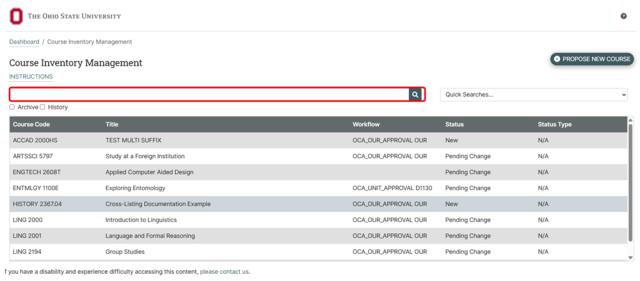
  1. Navigate to your CIM Courses or Programs landing page
  2. Search for the course or program with the history you want to view
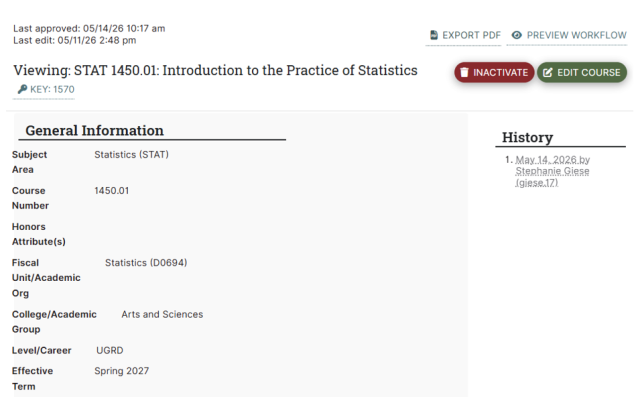
  3. Click the date that you want to view

    Screenshot of a course inventory management dashboard from Ohio State University showing a table with columns for Course Code, Title, Workflow, Status, and Status Type. The table lists various courses with statuses such as "New" and "Pending Change". The search bar with magnifying glass icon are circled in red.
    Screenshot of a course management system displaying details for a statistics course titled "Introduction to the Practice of Statistics." It includes course subject, number, honors attribute, academic unit, college group, level, and effective term, with options to export PDF, preview workflow, deactivate, or edit course.


How To Search For History

  1. Navigate to your CIM Courses or Programs landing page
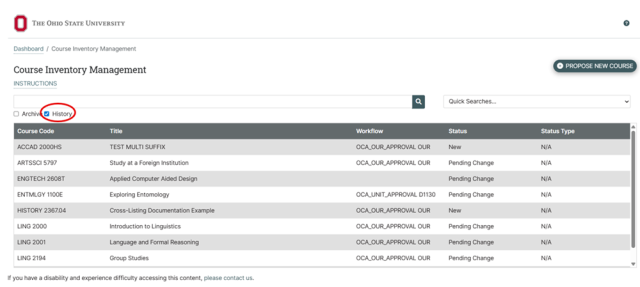
  2. Search for the course or program and check the History checkbox
  3. The search results list each entry in the history on a separate line with the date of approval in the Workflow column
  4. Choose the history you wish to review
     

    Screenshot of a course inventory management dashboard from Ohio State University showing a list of courses with columns for course code, title, workflow, status, and status type. The interface includes a search bar, a "Propose New Course" button, and a highlighted "History" check box, indicating a focus on tracking course approval statuses and workflows.