Save or Print a Certificate of Completion

To print a certificate for a course you have completed,

  1. Open your Completed Transcript.
  2. Click the View Completion Page  

    view completion page button

    button  on the same line as the course you want to print a certificate for.

  3. Click the print icon 

    adobe print icon

    to print the certificate or click the download icon  

    download icon

    to save it.


Helpful Note:

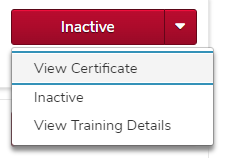
If your course has an Inactive button instead of a View Completion Page button, click the down arrow next to the Inactive button and click the View Certificate option.

the inactive dropdown menu expanded, showing the view certificate option