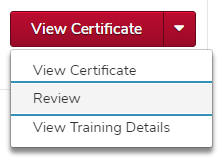
Review Completed Assessment
- Open your completed transcript.
Click the dropdown arrow

of the Assessment, click the Review option.
Helpful Note:
If the Assessment is inside a curriculum, you must first click the Open Curriculum button
, then click the Review option.
Review your assessment.
Helpful Note:
From the Review Questions screen, you will see a list of assessment questions and your answer to each of those questions.
Use the filters at the top to filter by questions answered correctly or questions answered incorrectly.
Select the Show Details check box to view Answer Explanations by the Provider (if applicable) and answers to incorrect assessment questions (if applicable).