Email can be an effective way of reaching those learners who are registered and planning to attend your ILT session. Emailing leaners is in addition to email that is triggered automatically from BuckeyeLearn.
As a best practice, sending email users should be used judiciously for critical reminders or to answer common questions related to that session.
For additional information, take the Creating and Managing Instructor-Led Training online course, or visit Cornerstone's online help.
- Find your session from the Manage Events and Sessions Page.
Click the roster icon

on the session for which you want to email learners.
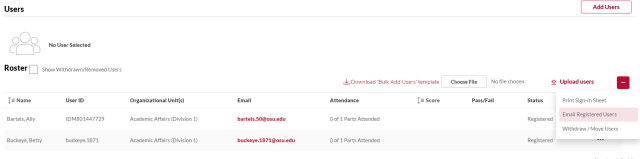
Click the Email Registered Users link in the Users section.
Create your email.
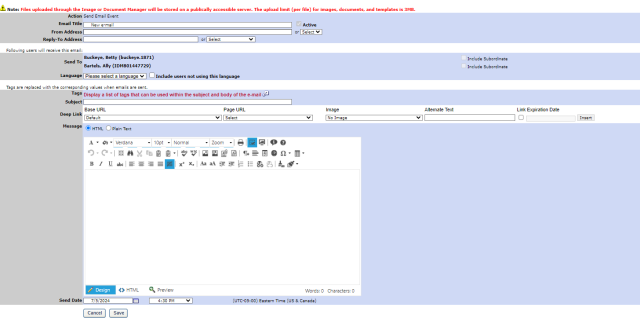
Type the email title.
- Type your email address in the From Address.
- Type your email in the Reply-To Address.
Review the Send To section.
Type a Subject.
Type the text of the email.
- Select a send date and time to send the email at a later time, if desired.
- Click the Save button to send the email.


