
Copy a Learning Assignment

Copying learning assignments is helpful when you frequently make the same kind of assignment.

  1. Navigate to the Manage Learning Assignment page.  
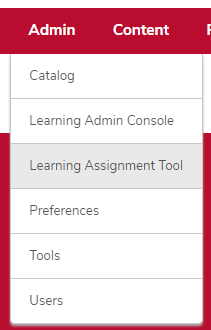
    the admin menu expanded with Learning Assignment Tool highlighted
    1. Hover over the Admin tab.
    2. Click Learning Assignment Tool. 
  2. Copy the learning assignment.  

    A learning assignment with the down arrow expanded and circled
    1. Click the down arrow on the learning assignment you want to copy.
    2. Click Copy.
 

Helpful Note:

All information except the information on the Users page will copy into a new learning assignment.
