- Navigate to the Room Matrix page.
- Complete the following fields:
- Facility ID (you may use the magnifying glass to search for Facility ID codes)
- Show Week of
- Start Time (modify values if necessary)
- End Time (modify values if necessary)
- Select Refresh Calendar.
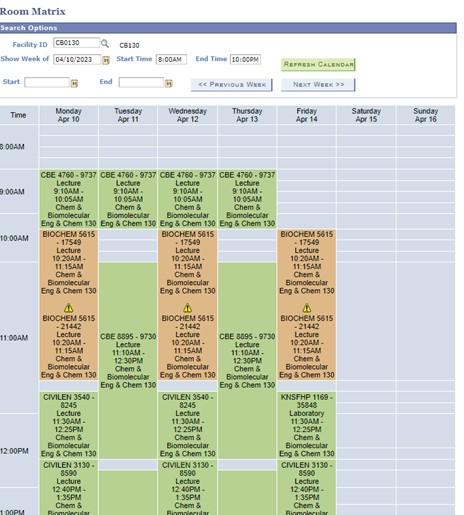
* Orange entries on the room matrix represent combined sections or overlapping reservations.
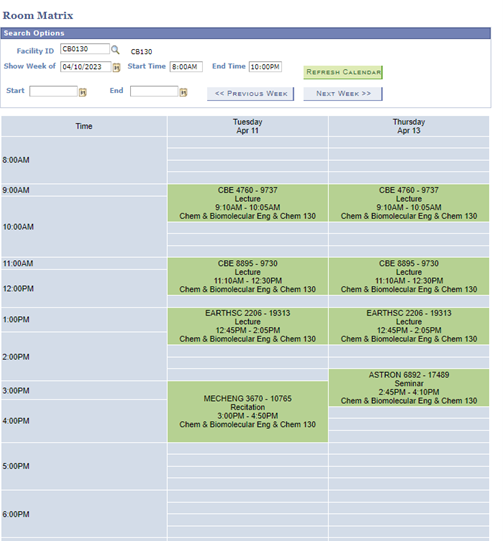
Adjust Display Options. Select a variety of options from the bottom of the matrix (e.g. select Tuesday and Thursday only, uncheck Show Events.)

The page is refreshed with only the edited options displaying. In this example, Tuesday and Thursday classes in CB0130.
Important Information
Important steps for returning accurate results
- After entering a Facility ID, always remember to select Refresh to return results for that space. Not doing so will result in a false return.
- The default Start and End times on the Room Matrix are 8am to 10 pm. To see results before 8am or after 10 pm, change the times and select Refresh.