This section introduces the steps for viewing the details of class associations under Adjust Class Associations.
At the completion of this section, you will be able to:
- View the credit hours for each class association
- View the components for each class association
- View the grading basis, graded component, and prerequisites for each class association
Path.
- Navigate to Adjust Class Associations. Complete the following fields:
- Term
- Subject Area
- Catalog Nbr
- Click Search and select a course.
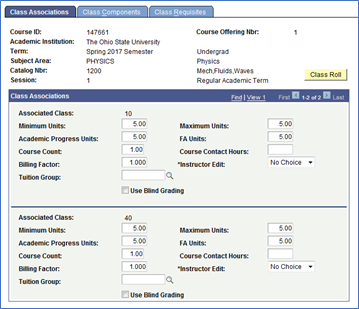
- On the Class Associations tab, view the minimum and maximum units (credit hours) set for each Associated Class number.
You can click View All on the top right to view all Associated Class numbers.
- Click on the Class Components tab.
- On this tab, you can view the Grading Basis, Graded Component, Class Components, and which component has a Final Exam.
- Grading Basis: GRD=Letter Graded, SUS =Satisfactory/Unsatisfactory, PRG=Progress -S/U, PGR=Progress -Letter Graded
- Graded Component: This reflects which component the instructor will use to grade their students. (i.e. If the Lecture is the graded component, the instructor will see all students on the grade roster. If the Recitation is the graded component, the instructor/TA will see the students on each Recitation as a separate grade roster. This is helpful if there are different TAs grading multiple recitations.)
- Class Components: This shows all of the components that are associated together by an Associated Class number. The different component options are Lecture, Lab, Recitation, Independent Study, Workshop, Seminar, Field Experience, and Clinical.
- Final Exam: This column shows which component will or will not have a final exam. If No is selected, the Scheduling Office will not reserve a classroom for this class during finals week. If Yes is selected, a classroom will be reserved during finals week, and that component's class meeting time will determine when the final exam will held.
- On this tab, you can view the Grading Basis, Graded Component, Class Components, and which component has a Final Exam.
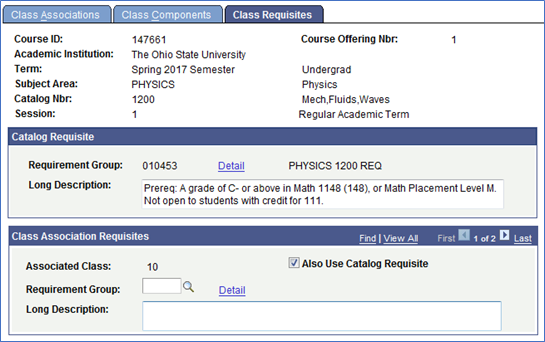
- Click on the Class Requisites tab.
On this tab, you can view if any prerequisites are being enforced. If there are any, you will see a Requirement Group number and the Long Description will show the prerequisites as they are listed in the Course Catalog. You can also have separate prerequisites for each Class Association.
Important Information
Adjusting Class Associations
- Only the Scheduling Office can make changes to the details listed under Adjust Class Associations. When possible, all changes should be requested prior to students enrolling.
- Graded Components can NOT be changed after students have enrolled.