This section introduces the steps for viewing and modifying class sections. Instructors and enrollment limits can be adjusted from this function after access to other functions have been disabled for a given semester.
At the completion of this section, you will be able to:
- View and update the status, enrollment limits, and instructors for the sections of a scheduled class.
Path.
- Navigate to the Update Sections of a Class component. Complete the following fields:
- Academic Institution (OSU SI, if not defaulted)
- Term
- Subject Area
- Catalog Nbr (optional)
- Click Search and Select a Course.
- Update the following fields on the Class Meeting Pattern tab:
- ID
- Instructor Role
Access
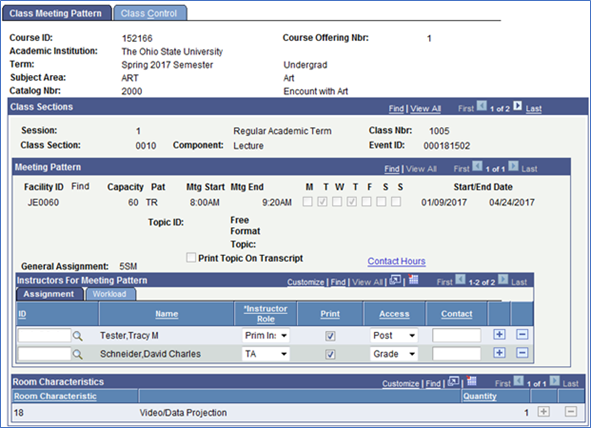
- Click the Class Control tab.
- Click the Class Enrollment tab.
The Class Enrollment Limits tab is located mid-page under Class Sections.

Adust the following fields (if necessary):
- Enrl Cap (Enrollment Cap)
- Wait Cap
Min Enrl (Minimum Enrollment)
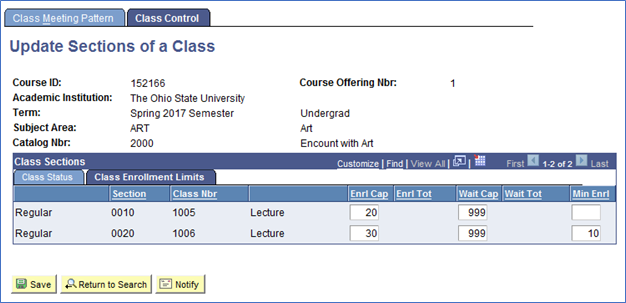
Adjusting Enrollment Consent
- Enrollment Consent requirements (Instructor, Department, No Consent) can be adjusted on the Class Status tab.
Hiding Sections of a Class
- The option to hide a section from the Schedule of Classes is available on the Class Status tab. Just uncheck the "Schd Print" box on the right.
Changing Instructors and Enrollment Capacities after access is limited
- Two weeks prior to the start of the given term, departments will only have access to change enrollment limits and instructor information under Update Sections of a Class.