This section introduces the steps for searching for classes. The Class Search feature is used to search or browse for classes with in a specific term.
At the completion of this section, you will be able to:
- Search for classes using specific criteria
- View the details of a specific class
Path.
Complete the following fields on the Class Search page:
- Institution
- Term
- Campus
- Subject
- Course Number
- Course Career- This defaults to Undergraduate. Change this field to see courses outside of the Undergraduate career.
- Uncheck Show Open Classes Only checkbox to see all offerings regardless of status.
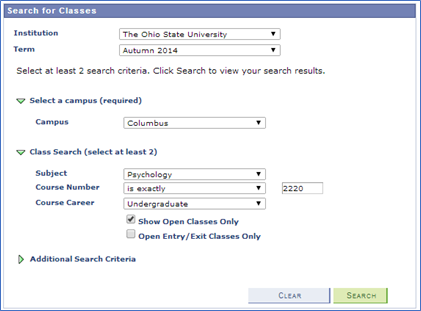
- Click Search.
- No results will be returned if the results exceed the maximum limit of 300 classes.
View the Results.
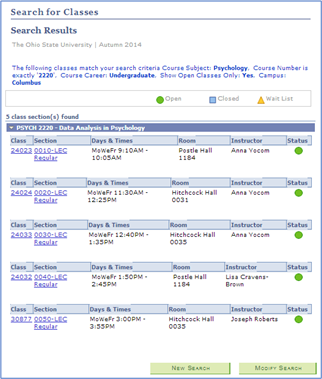
- Click the Section link.
- The Section link contains the Class Number, which is the unique identifier for each section. This is what the student uses to enroll into a section.
- Review Class Detail.
Class Detail provides detailed information about the class including how and when it is being taught, enrollment availability, and the course description.
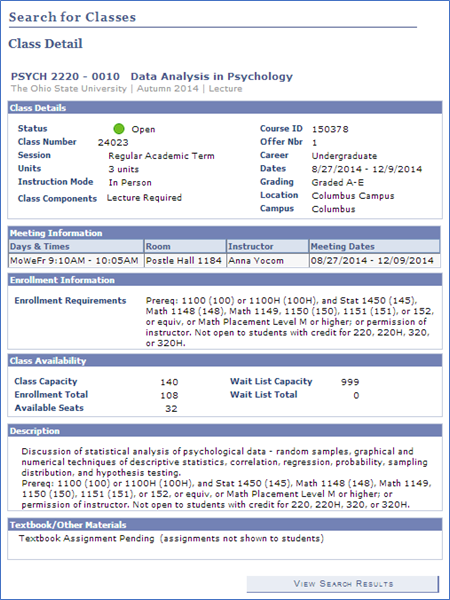
- Click View Search Results.
- Click Modify Search.
- Update Class Search Criteria.
- Confirm both Show Open Classes Only and Show Open Entry/Exit Classes Only are unchecked.
- Click Additional Search Criteria - Providing additional search criteria will narrow your search.
- Complete the following fields:
- Check the Monday box
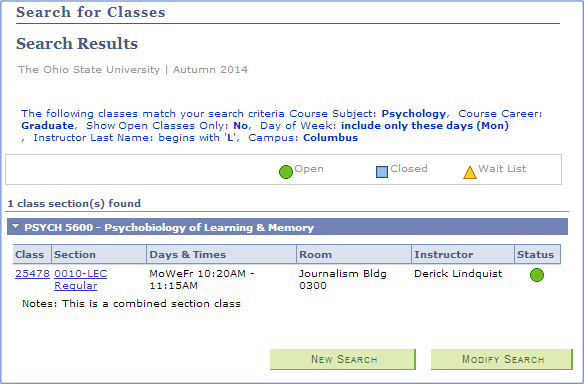
- Instructor Last Name beings with "L"
- Course Career is Graduate
Click Search.
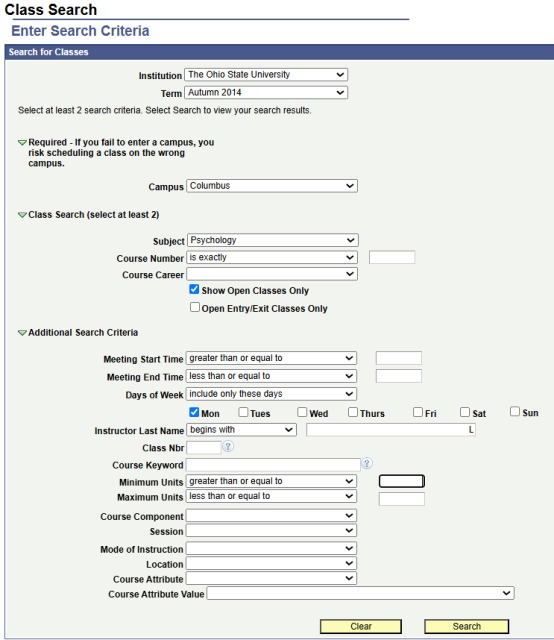
- View the Results.
The search returned Psych 5600, a Graduate Psychology class taught on Mondays by Derick Lindquist.
Important Information
Common Error in searching for classes:
- No results will show when your search returns more than 300 classes. Limit your search results to less than 300 class by additional criteria.
- Uncheck the "Show Open Classes Only" box to see open, closed, and waitlisted sections of a course.
- Class Search defaults to Undergraduate career. Select Graduate or a specific professional career in order to see these courses. Leave the drop-down box blank to see courses in all careers.