This section will demonstrate how to properly set up an Education Abroad Course.
- Work with your Global Education Abroad Liaison, Resident Director, in OIA to determine which programs should be added to the Schedule of Classes for each semester.
- Using the Schedule New Course or Maintain Schedule of Classes pathway in SIS, create a new class section with the following criteria:
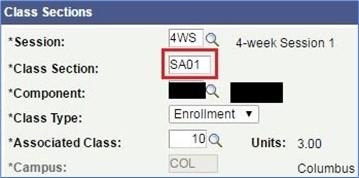
- Basic Data tab > Class Sections:
- Add "SA" to the start of the Class Section Number
- Please note that any course component (LEC, LAB,FLD,etc.) may be part of an Education Abroad Section.
- Meetings Tab > Instructors for Meeting Pattern:
- List the Resident Director listed as Primary Instructor with Post Access.
- List the Resident Director listed as Primary Instructor with Post Access.

- Meetings Tab> Meeting Pattern:
- List the Start/End Date as travel dates of the program

- Reserve Cap tab > Reserve Capacity Requirement Group:
- Set the Reserve Cap for IASA Student Group.
- Start Date: Typically, the day enrollment begins for the term.
- Requirement group 13180 (Always)
- Cap Enrl: set as needed
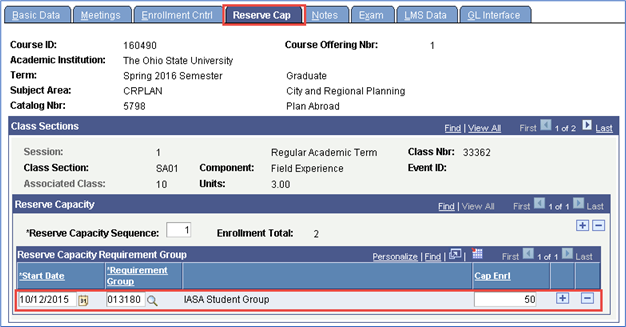
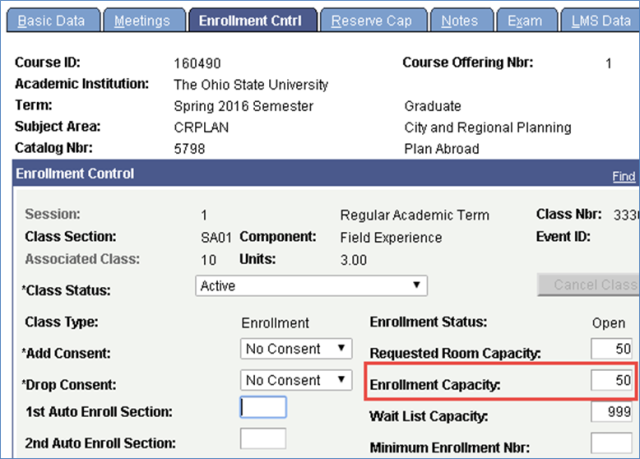
Note: Cap Enrl Must match the Enrollment Capacity on the Enrollment Cntrl Tab
- For 5000 - level courses, create both an Undergraduate and Graduate section if necessary, and combine them in the Combined Section Table.

Email the Class Number Study Agreement Id, and AEWorktag to the appropriate Term Scheduling Coordinator in the OUR Scheduling Office and copy OIA-GlobalEducation@osu.edu.
- If you do not have the Study Agreement ID and AEWorktag, please contact Global Education at OIA-GlobalEducation@osu.edu
- Example of Worktags and Study Agreements IDs

- The Term Scheduling Coordinator in the OUR Scheduling Office will then add the International Location Code and the OIA Workday/Study Agreement ID attribute.
- The Office of International Affairs -- Education Abroad will communicate the necessary and approved Worktags and Study Agreement IDs to both the College Liaisons and the Department Scheduling Contacts of the departments that are offering Education Abroad sections during a given term. Send the class number (SIS), Worktag (series of letters and numbers), Worktag (series of letters and numbers), and study agreement ID (series of letters) to appropriate term manager in the OUR Scheduling Office and copy Tiffany Pierskalla (.5) in OIA. Contact information for the Scheduling Office can be found in the Classroom Scheduling Office Contact List.
Examples of Worktags and Study Agreement IDs:
Worktag --AE102357
Study Agreement ID --ST ARTS2U
Worktag -- AE102337
Study Agreement ID -- ST FCOBPAN
Worktag -- AE102058
Study Agreement ID -- MS TORONTO
Worktag -- AE102160
Study Agreement ID -- DRSDN LANG
- The Scheduling Office will then add the International Location Code and the OIA Worktag/Study Agreement ID attribute.
Virtual Education Abroad
- These began in 2020 as virtual education abroad experiences
- Set up is exactly the same as above, EXCEPT:
- Section should be VE##(rather than SA##)
- Instruction mode should be DL
An instruction mode of DL makes the location code moot. - The reserve cap should use #016152 for the IAVE student groups.
Note: It is the responsibility of the offering academic unit to ensure that the courses attached to the global education program is set up properly and in a timely fashion so students who are admitted to the program can register for the course when their registration windows are open. Student Financial Aid cannot process a student's financial aid for the global education program unless and until the student is registered in the study abroad course.