This section provides information that scheduling contacts need to know about prerequisites, including:
- Viewing prerequisites for a course
- Prerequisite Enforcement
- Instructor Consent
- Updating Prerequisites
Viewing Prerequisites for a Course
Prerequisites are courses, standings, grades, programs, majors, etc. that are required in order to enroll in a course. Exclusions are part of a prerequisite, and are courses, standings, majors, etc. that students must not have in order to enroll in a course. An exclusion typically begins with the phrase "Not open to students..."Prerequisites for a class can be viewed in three different places:
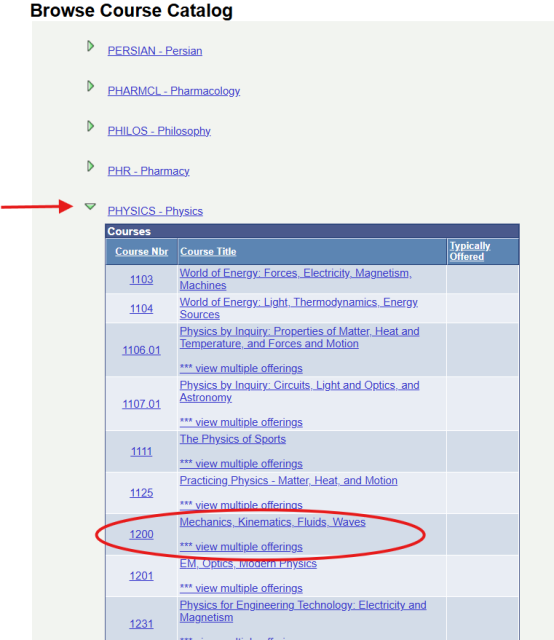
- Navigate to the desired Subject Area by using the alphabet at the top of the screen.
- Click on the Subject Area to expand the list of active courses in that subject.
- For courses with multiple offerings, select the desired Course Offering from the next screen.
The prerequisites will show at the bottom under "Description", and if they are being electronically enforced, they will also show under "Enrollment Requirements".
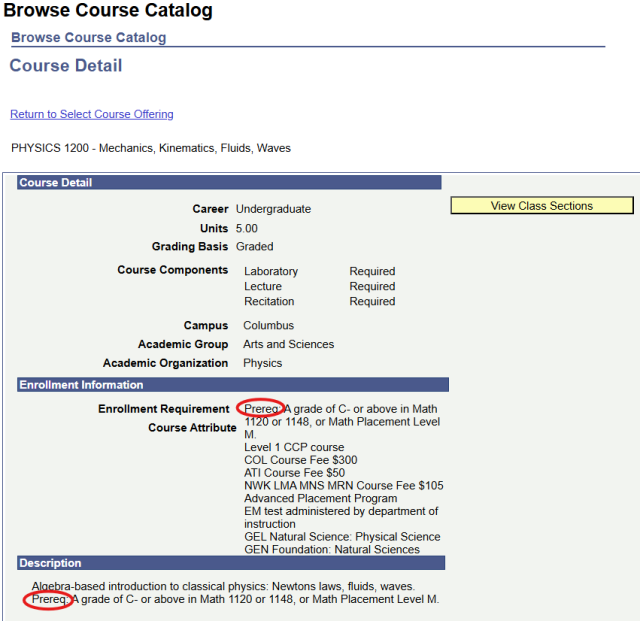
The prerequisites will show at the bottom under "Description", and if they are being electronically enforced, they will also show under "Enrollment Requirements".
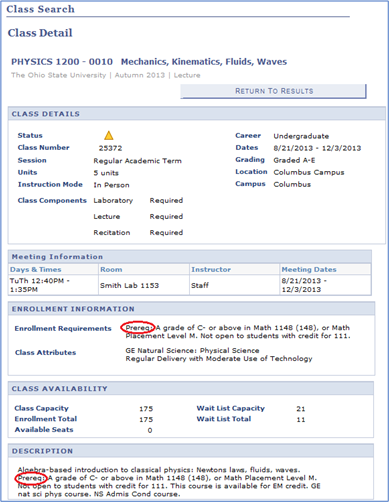
The prerequisite will only show here if it is being electronically enforced.
Prerequisite Enforcement
Per department request, prerequisites are built manually for each course and electronically enforced by the Scheduling Office.
- If prerequisites for a course or an entire department are not being enforced send an email to the Scheduling Office, and we will send you a spreadsheet containing all of your department's prerequisites so that you can let us know which should/should not be enforced.
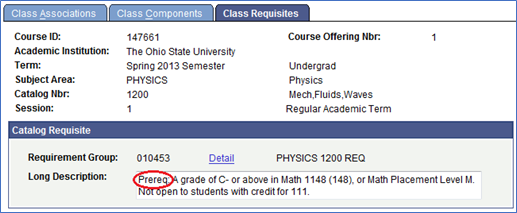
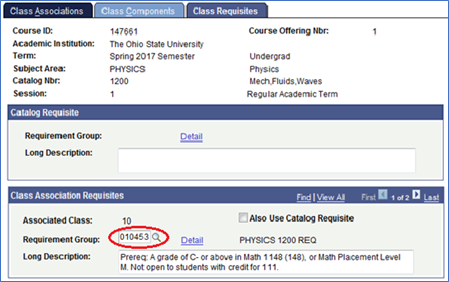
You can also choose to enforce a prerequisite for just one specific term, or just one section of a class. To do this, our office would attach the Requirement Group Number associated with the prerequisites to the Class Requisite tab in Adjust Class Associations (shown below), as opposed to entering the Requirement Group Number on the Offerings tab of the Course Catalog.
Instructor Consent
Some prerequisites list "permission of instructor" or "permission of department" as part of the prerequisite. Consent is electronically enforced separately from prerequisites, and they cannot both be enforced at the same time. Below are some examples of what determines which is enforced:
- Prereq: Permission of Instructor-If the only prerequisite listed is "permission of instructor," Instructor Consent will be electronically enforced.
- Preq: Math 1148 or permission of instructor- If there is an "or" between the prerequisite and the permission of instructor, then only the prerequisite will be electronically enforced.
- Prereq: Math 1148 and permission of instructor- If ther is an "and" between the prerequisite and the permission of instructor, then only the Instructor Consent will be electronically enforced.
- Consent is enforced at the course level in the Course Catalog.
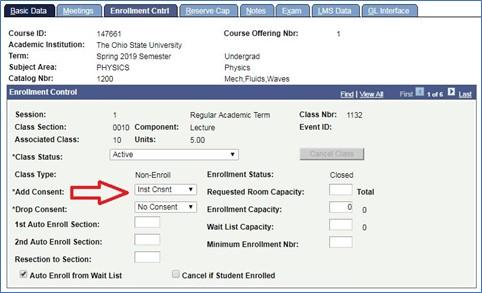
- Consent can also be electronically enforced for just one term or just one section of a class. Up until two weeks before the start of the term, Scheduling Contacts can adjust the consent on the Enrollment Cntrl tab of the class by using the following path:
Prerequisite Updates
Any updates to prerequisites need to be submitted through the curriculum.osu.edu course change process and be approved by the Office of Academic Affairs before the change can be implemented by the Scheduling Office. The deadlines for submitting course changes for each term are below, and are approximately 45 days before registration.
Course change forms to be included in normal registration for upcoming term, to Registrar by:
Term
Spring Semester: September 1
Summer Term: January 1
Autumn Semester: February 1
- Access to curriculum.osu.edu can be attained by emailing OTDI-access@osu.edu. Provide them with your name.##, Academic Org# and level of access needed (usually Unit Approval).
Important Information
Prerequisite Enforcement
- If prerequisites for your department are not being electronically enforced and you would like them to be, email the Scheduling Office.
Instructor Consent
- Permission of Instructor and prerequisites cannot be electronically enforced at the same time. Enforcing Instructor consent will override the prerequisites.
Prerequisite Updates
- Updates to prerequisites must go through the curriculum.osu.edu course change process and be approved by OAA before the Scheduling Office can implement changes.
- Changes to prerequisites must be submitted approximately 45 days prior to registration for that term.