Introduction
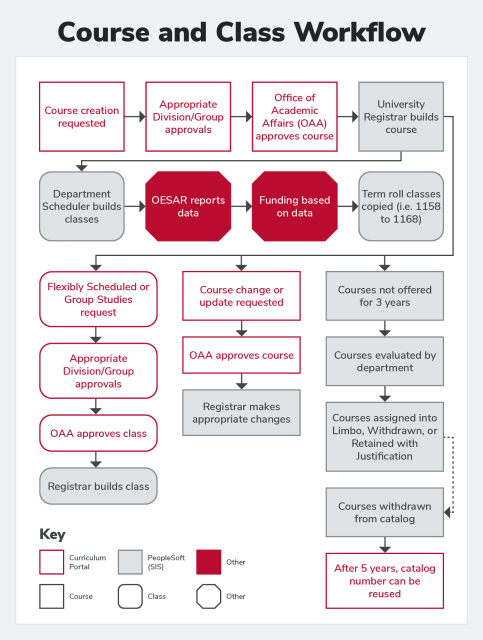
University Registrar Builds Course (PeopleSoft -SIS) Options
Flexibly Scheduled or Group Studies request (Curriculum Portal)
Flexibly Scheduled or Group Studies request (Curriculum Portal)→Appropriate Division/Group approvals (Curriculum Portal)→Office of Academic Affairs approves class (Curriculum Portal)→Registrar builds class (PeopleSoft -SIS)
Course Change or Update Requested (Curriculum Portal)
Course change or update requested (Curriculum Portal)→Office of Academic Affairs approves course (Curriculum Portal) →Registrar makes appropriate changes (PeopleSoft -SIS).
Course not offered for 3 years (PeopleSoft SIS)
Course not offered for 3 years (PeopleSoft SIS)→ Courses evaluated by department (PeopleSoft SIS) →Courses assigned not Limbo, Withdrawn, or Retained with Justification (PeopleSoft SIS)→Courses withdrawn from catalog (PeopleSoft -SIS)→ After 5 years, catalog umber can be reused (Curriculum Portal)
Department Scheduler Builds Classes (PeopleSoft SIS)
Department Scheduler builds classes (PeopleSoft SIS) →OESAR reports data (Other)→Funding based on data (Other)→Term roll classes (i.e. 1158 to 1168)(PeopleSoft -SIS)
Definitions
- Class: A section of a course that is offered during a specific term during a defined meeting pattern.
- Course: The unit of instruction or research through which the educational program of the university is offered to its students
- Curriculum Portal: The electronic form and workflow for submitting requests, changes, updates to courses and flexibly scheduled or group studies class requests.
- Flexibly Scheduled: A class that will not follow the normal semester, term or session pattern/dates.
- Limbo: A course is removed from the course catalog, but not formally withdrawn.
- PeopleSoft (SIS): The information system that stores student, course, and class data.
- Withdrawn: A course is formally removed from the course catalog and the curriculum.
Scheduling Contact Responsibilities
- Maintain the class offerings schedule for your department
- Enter new course sections
- Delete course sections that will not be offered
- Adjust existing course sections
- Logically number course section as they will appear in the schedule of classes
- Correctly link associated course components
- Enter day/time /location of class offerings
- Enter and update instructor names, roles, and access levels for all offerings
- Control requested room capacities, enrollment capacities, and wait list capacities
- Add combined sections to the combined sections table
- Ensure that credit hours, grading basis, and graded components are accurate
- Ensure that instruction modes are correct.
- Submit one time offering requests
- Curriculum.osu.edu
- Direct all student organization room requests to the Ohio Union
- Handle requests from faculty and teaching assistants
- Submit event requests, classroom changes, grading questions, etc.
- Attend Scheduling Contact meetings
- Hosted by the Scheduling Office Staff
- Follow scheduling policies when creating schedules
- 20% pre-assignment limit
- 70%room fill
- No more than 11% of class meetings offered at a given hour during prime time hours (9am-3pm)
- Utilize registrar.osu.edu website
- Follow deadlines as outlined on the Scheduling Calendar
- View updated GA room lists
- View final exam schedules
- University Calendars
- University Registrar forms
- Training Documentation
Scheduling Office Responsibilities
- Set up Term Roll
- Copies classes from year to year (i.e. AU 15 to AU 16)
- Departments responsible fro ensuring accuracy of copied classes
- Place classes in rooms that best meet the requirements of the class while still maintaining equality among departments
- Assist with inquiries from Scheduling Contacts via email and phone
- Make class adjustments after Scheduling Contact access has been reduced
- Two Fridays before the start of the term
- Schedule exams
- Final Exams
- Common Exams
- Common midterms
- Provide accurate and timely information regarding class scheduling
- Email reminders of upcoming deadlines
- Inform departments where they stand regarding scheduling policies
- Inform departments of potential grading issues
- No instructor assigned, no post access, etc.
- Schedule One Time Offerings after they have been approved by OAA
- Maintain the Course Catalog
- Build and maintain electronic prerequisite enforcement
- Confirm or deny event requests
- Maintain the registrar.osu.edu website
Scheduling Policies
20% pre-assignment limit
- Pre-assignments are those meeting patterns in which the department assigns a classroom pool room before the Scheduling Office places classes
- Departments can on pre-assign 20% of their meeting patterns needing classroom pool rooms
- If a single class has two meeting patterns and both are pre-assigned, they both count towards the 20% limit
- Meeting patterns scheduled into departmentally-owned spaces do not count towards the 20% limit
- The Scheduling Office reserves the right to remove pre-assigned spaces if:
- They do not follow an approved meeting pattern
- The room can be better utilized by another class (does not meet 70% policy)
- The time of the class prevents maximum use of the room throughout the day
70% seat fill rule
- Classes must fill assigned classroom to at least 70% of the room's capacity
- When pre-assigning, enrollment capacities must be greater than or equal to 70% of room capacity
- After students have registered, classes not meeting this requirement may be moved to accommodate larger classes
11% time spread
- No more than 11% of meeting patterns can meet at a certain time during prime time hours (9a-3p) in General Assignment rooms
- Ex. No Mor2 se than 11% of classes can meet at 10:20 am
- Classes meeting in General Assignment rooms must be spread evenly over each day of the week
- Ex. If three classes meet on Tues/Thurs, then two or three classes should meet on Wed/Fri
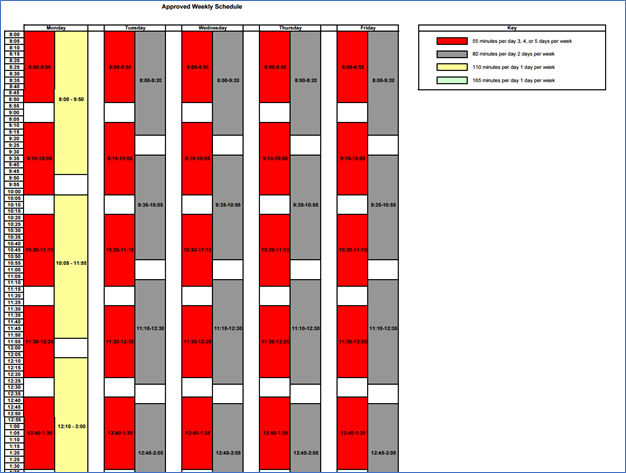
Approved Weekly Schedule
Philosophy
Classes following primary meeting patters will be accommodated with classroom space first. Alternate meeting patterns will be accommodated with classroom space second, and will be subject to availability. Meeting patterns not listed below will be accommodated with classroom space, if possible, after all requests for primary and alternate meeting patterns have been fulfilled.
Primary meeting pattern formats, by course credit hour value:
2 semester hours: 110 minutes per day, 1 day per week (M)
3 semester hours: 55 minutes per day, 3 days per week (M/W/F)
3 semester hours: 80 minutes per day, 2 days per week (T/R)
4 semester hours: 55 minutes per day, 4 days per week (T-F)
5 semester hours: 55 minutes per day, 5 days per week (M-F)
Alternate meeting pattern formats, by course credit hour value:
3 semester hours:80 minutes per day, 2 days per week (W/F)
3 semester hours: 165 minutes per day, 1 day per week (M)
4 semester hours: 55 minutes per day, 4 days per week (M-R)
Space and Scheduling Guidelines
Guiding Principle: colleges will take responsibility for assuring that space is used appropriately and that student access to courses is a priority.
- Classes not following an approved patter will be considered an exception.
- In order for a course to follow the pattern it must meet in the same space for each occurrence.
- Classes following an approved pattern will be scheduled before courses that are exceptions
- A department (or group of departments) may use a combination of classes to fulfill a pattern and not be considered an exception, with the understanding that his could cause exam scheduling difficulties.
- Term classes meeting for half of a semester should be paired with a course appropriately using the same space for the other half of the semester in order to not be considered an exception.
- Classes crossing time blocks (e.g. Spring Semester and May Session) will be considered an exception.
- Classes crossing terms (e.g. Spring Semester and May Session) will be considered an exception.
- Class enrollment limits are required to fill 70% of the seats in the room assigned.
- Departments are required to spread their courses throughout the day so that no mare than 11% of their class meetings occur at any one time of the day.
- Departments are required to spread their courses throughout the week by balancing the number of classes meeting three times a week with the number of classes meeting twice per week.
- Priority for specific general assignment classrooms or building preferences does not supersede following an approved pattern.
- All pre-assigned classes (those manually placed by the department) must follow an approved pattern.
Term Definition
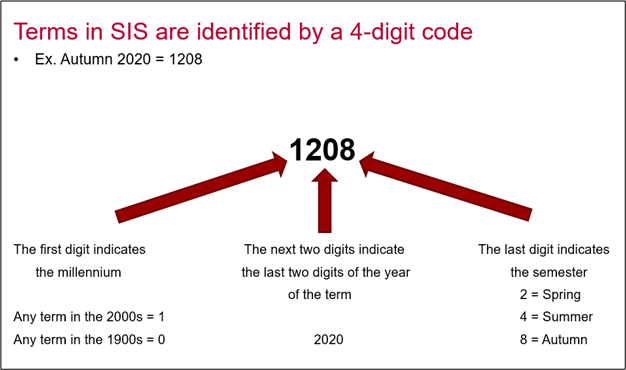
Terms in SIS are identified by a 4 -digit code
First digit - Indicates the millennium . Any term in the 2000s= 1. Any term in the 1900s= 0.
Next two digits - Indicate the last two digits of the year of the term
Last digit -Indicates the semester 2 = Spring 4 = Summer 8 = Autumn
Accessing the Student Information System (SIS)
- Navigate to Buckeye Link
Under Resources select "Staff & Faculty"
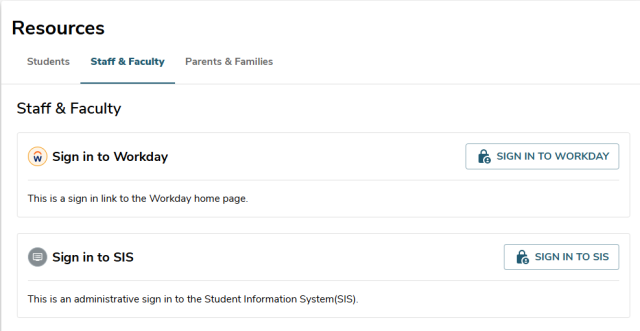
- Select "Sign into SIS"
Set Up User Defaults
- Navigate to the User Defaults Page
- On the User Defaults 1 tab, complete the following information:
- Academic Institution = OSUSI
- Career Group SetID = OSUSI
- Facility Group SetID = OSUSI
- Academic Career = UGRD
- Term = whichever term you are most frequently working in