Instructions from the Office of the University Registrar for viewing term withdrawal history.
Path.
- Navigate to the Quick Enrollment page.
- At the Search page, locate the student’s account by entering either the student’s ID, Campus ID, National ID or their First and Last Name.
- Select Search to view the term withdrawal history.
Select the Term Withdrawal tab to view the term withdrawal history. The most recent term activated will be visible. Select View All to see a list of active terms or you may advance one term at a time by selecting the Show Next Row option (play button icon). Visual locations are shown in the screenshot below.
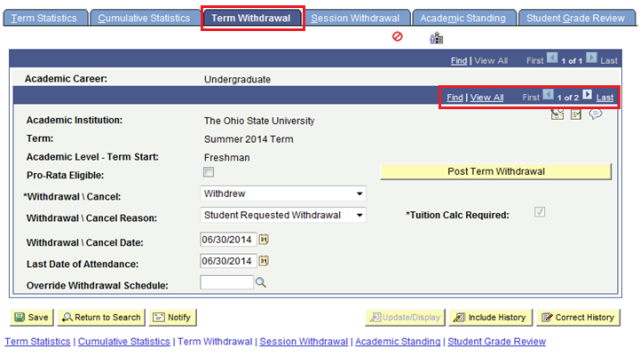
- Review the fields.
- Academic Level – Term Start: The student’s academic level at the start of the specified term.
- Pro-Rata Eligible: Checkbox to enable pro-rata refunding according to Ohio State refund rules.
- Withdraw / Cancel: Withdrew or Canceled.
- Withdraw / Cancel Reason: The withdrawal or cancel reason used for adjustments.
- Withdraw / Cancel Date: The last date of attendance.
- Last Date of Attendance: The action date for the withdrawal or cancellation.
- Override Withdrawal Schedule: Defines the refund calculation for the student. Values are defined in Student Financials.
- Post Term Withdrawal button: Action button to run the term withdrawal process.