This job aid provides instructions for viewing a Student Information Release. The Family Educational Rights and Privacy Act of 1974, as amended (otherwise known as FERPA), sets forth requirements regarding the privacy of student records. FERPA governs the release of education records maintained by an institution and access to those records. Student record information generally may not be released without the expressed, written consent of the student.
- Navigate to Admin Buckeye Link (Student) page.
- Enter any of the student’s available data into the Search Criteria fields:
- ID
- Campus ID
- First and last name
- Select Search, then select the accurate record from the results list.
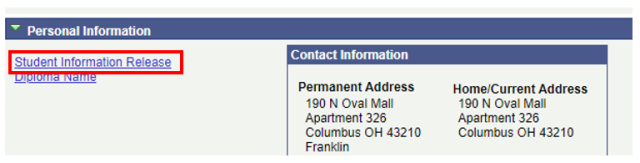
On the Buckeye Link tab, scroll to the Personal Information section and select the Student Information Release link.

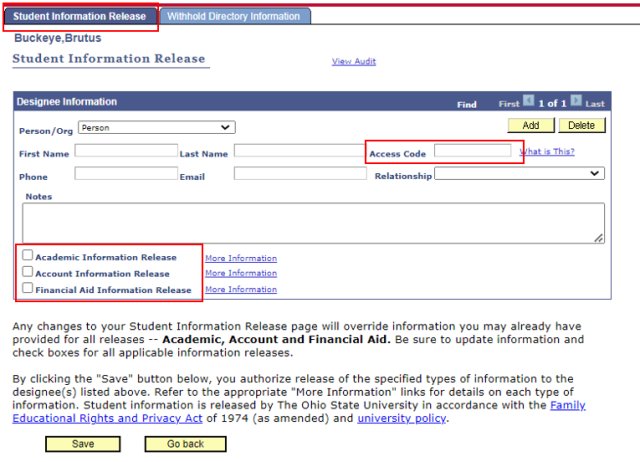
- View the Student Information Release tab. This page will list any persons or organizations that a student has authorized to receive information. A student can enter multiple designees.
- A unique Access Code is chosen by the student for each authorized individual to use to validate their identity when requesting the release of information.
- Check marks denote which specific types of information the student has released to an authorized individual: Academic Information, Account Information, and Financial Aid Information.
If there is no person or organization listed, the student has not permitted the release of information to any individual or organization
View the Withhold Directory Information tab. If the student has chosen to restrict the release of directory information (indicated by selecting the checkbox), a FERPA icon

is displayed on all pages within the student information system.