Instructions from the Office University Registrar for viewing student delinquency history.
Path.
- Navigate to the Student Delinquency History page.
Enter Search Criteria, then select the Search button link to open the student's record.
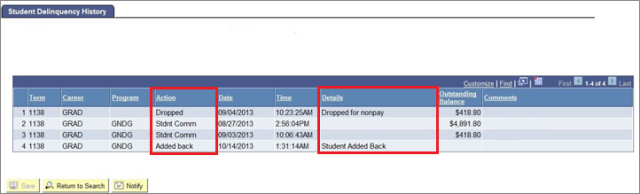
- View the Student Delinquency History. Possible Actions and Details may include:
- Dropped = Dropped for nonpay
- Stdnt Comm = Student received an email communication to email address that appears in comments field. (Email addresses in the above example were erased for privacy reasons.)
- Added back = Student Added Back
- Adm. Rev = Student was Revoked for (autumn, spring or summer)
- Excluded = Details will show the name of the person who posted an Exclusion from System Processes Service Indicator for the student.