Instructions from the Office of the University Registrar to view name changes. Transcripts and enrollment verification will use a student's Primary Name. Current student's update their Primary Name by completing an online Change of Record request. Student's can create and edit their Preferred Name online at my.osu.edu and they can submit a Diploma Name for their diploma and the commencement bulletin.
Staff View
- Navigate to the Names page.
Enter Search Criteria, then select the Search button link to open the student's record.
The referenced media source is missing and needs to be re-embedded.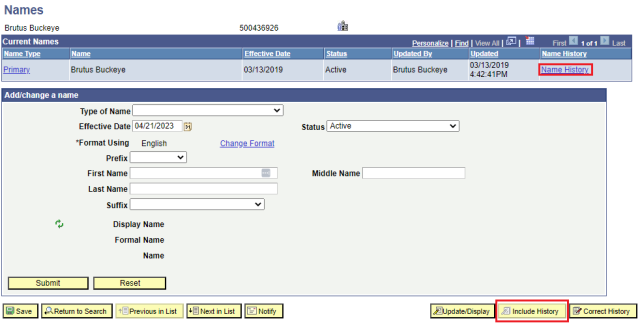
- To view all name records, select the Include History button link.
- In the Current Names section, select the Name History link to view the student's history.
Student View
Primary and Preferred Names
- Navigate to Student Services Center (Student).
- Enter Search Criteria, then select the Search button link to open the student's record.
- Select the General Info tab.
Either select the Names link to jump to the Names section or scroll to it. A student's Primary Name and optional Preferred Name will be listed.
The referenced media source is missing and needs to be re-embedded.
Diploma Name
Students have the ability to add or update their diploma name through the end of the 10th week of the term if they are an applicant for graduation.
- Login to BuckeyeLink.
- Select the Diploma Name link in the Personal Information section and follow the instructions provided.